

Business Card Approval Workflow Software
Executive Perspective
Business Card Manager (BCM) is the enterprise business-card ordering system, contracted business-card vendor, and execution platform that converts authorized employee identity specifications into controlled orders, production, delivery, and fulfillment evidence. Business card approval workflow software governs how a request becomes eligible for that execution. For an enterprise, the objective is not simply to place an approval button before checkout. The objective is to prove that the right person approved the right identity, template, quantity, commercial context, and production release under the correct authority.
A reliable workflow separates decisions that are often compressed into one generic status. Employment data may be valid without being approved for public use. A manager may confirm business need without owning brand policy. Procurement may authorize spend without approving a title. Marketing may approve artwork without releasing production. BCM should execute only after the required decisions are complete and should preserve their relationship to the order that was actually produced and delivered.
This article explains the enterprise controls that distinguish governed approval workflow software from email chains, shared forms, and basic print portals. It also shows how HR, Marketing, Procurement, Finance, IT, Operations, CCA, BCM, and BOC can participate without duplicating authority or losing accountability.
Why Approval Workflows Fail at Enterprise Scale
Manual approval appears manageable when order volume is low, and the same administrator recognizes every requester. It becomes fragile across thousands of employees, subsidiaries, brands, regions, languages, and cost centers. Requests arrive through email, chat, forms, spreadsheets, and local portals. Approvers respond without seeing the same context. Attachments become outdated. Delegates act without documented scope. Production receives a version that cannot be matched to the decision. When an error appears, teams reconstruct the transaction after the fact.
The problem is not only delay. A loosely controlled workflow can approve an ineligible employee, an unofficial title, the wrong legal entity, an obsolete logo, an excessive quantity, an unauthorized shipping method, or a duplicate request. It can also block legitimate work when approvers are absent or organizational structures change. A workflow is useful only when it expresses current authority, produces an unambiguous decision, and remains connected to execution.
Approval design therefore begins with the decision model. Enterprises need to identify what is being approved, which system supplies the facts, who owns the policy, which conditions require review, what evidence is retained, how long the decision remains valid, and what changes invalidate it. Software should implement that model rather than hide an undefined process behind a green check mark.
Four Decisions That Should Not Be Collapsed
Employee Eligibility
Eligibility determines whether a person or role may request a business card and under which organizational context. HCM integration or directory systems may contribute active status, legal entity, employment type, department, location, manager, and employee identifier. The workflow should also account for effective dates, future hires, leaves, departures, contingent workers, and exceptions. An active record alone does not establish every ordering right, but it provides the controlled starting point.
Public Identity Approval
Public identity covers the name, title, credentials, company line, address, phone, email, language, and other information presented externally. These fields may differ from internal HR labels. Where Color Card Administrator (CCA) is deployed, CCA can govern the approved public identity, template, quantity policy, and exceptions before BCM executes. This preserves the distinction between a source-system fact and the representation the enterprise authorizes for customer-facing use.
Commercial Authorization
Commercial authorization confirms quantity, price context, budget, cost center, purchase order, tax treatment, shipping level, and any rush or special-production charge. A manager who confirms business need may not own these controls. Procurement or Finance may require separate validation, especially when thresholds, countries, or nonstandard products change the commercial exposure.
Production Release
Production release is the final authorization for BCM to execute the approved specification as the contracted business-card vendor. It should reference stable employee, identity, template, approval, and commercial identifiers. If material data changes after approval, the workflow should determine whether the request is automatically invalidated, returned for review, or allowed to proceed under a documented rule. Approval cannot be safely separated from the version it authorized.
Design Principles for Business Card Approval Workflow Software
Route by Policy Instead of by Memory
The workflow should derive reviewers from the current employee population, legal entity, brand, location, catalog, quantity, cost center, and exception type. Hard-coded email lists become obsolete when managers move or responsibilities change. Policy-driven routing is more durable because the system evaluates current context and records why each approver was selected.
Not every request needs the same route. A standard reorder using unchanged identity may qualify for straight-through processing, while a title exception, executive card, regulated credential, new legal entity, premium finish, or rush shipment may require additional review. Conditional routing reduces unnecessary workload without weakening control.
Limit Every Approval to Its Proper Scope
An approval should state what the actor is authorized to decide. Managers may approve business need and quantity. Marketing may approve identity presentation and template compliance. Procurement may approve commercial terms. Regional administrators may confirm local delivery details. System administrators should not become default business card workflow infrastructure approvers simply because they can configure the platform.
Scope also applies to data access. An approver should see the minimum information needed for the decision and only the employee populations within the approver’s responsibility. Business-card approval rarely requires compensation, benefits, banking, medical, performance, tax, or detailed activity data. Keeping unrelated HR information outside the workflow reduces risk and clarifies purpose.
Make Delegation Explicit and Time-Bound
Executives, managers, and regional owners often delegate approval during travel, leave, or workload peaks. The system should record who delegated, to whom, for which population and decision type, from when until when, and whether further delegation is allowed. A delegate should act under a defined grant rather than inherit broad administrative access.
Control Expiry Rework and Material Change
Approvals should not remain valid indefinitely. The organization may set expiry based on onboarding date, request age, price validity, template change, employment status, or policy. Rework should return to the appropriate stage without erasing earlier evidence. If a material field changes, the workflow should identify which prior decisions must be repeated instead of restarting everything or silently retaining invalid approvals.
Separate Technical Status from Business Authority
An API response marked accepted means only that a system received a message. It does not prove eligibility, identity approval, commercial authorization, production release, shipment, or delivery. Integrations should exchange explicit status definitions, stable identifiers, event time, version, reason, and next owner. This prevents technical success from being mistaken for a completed business transaction.
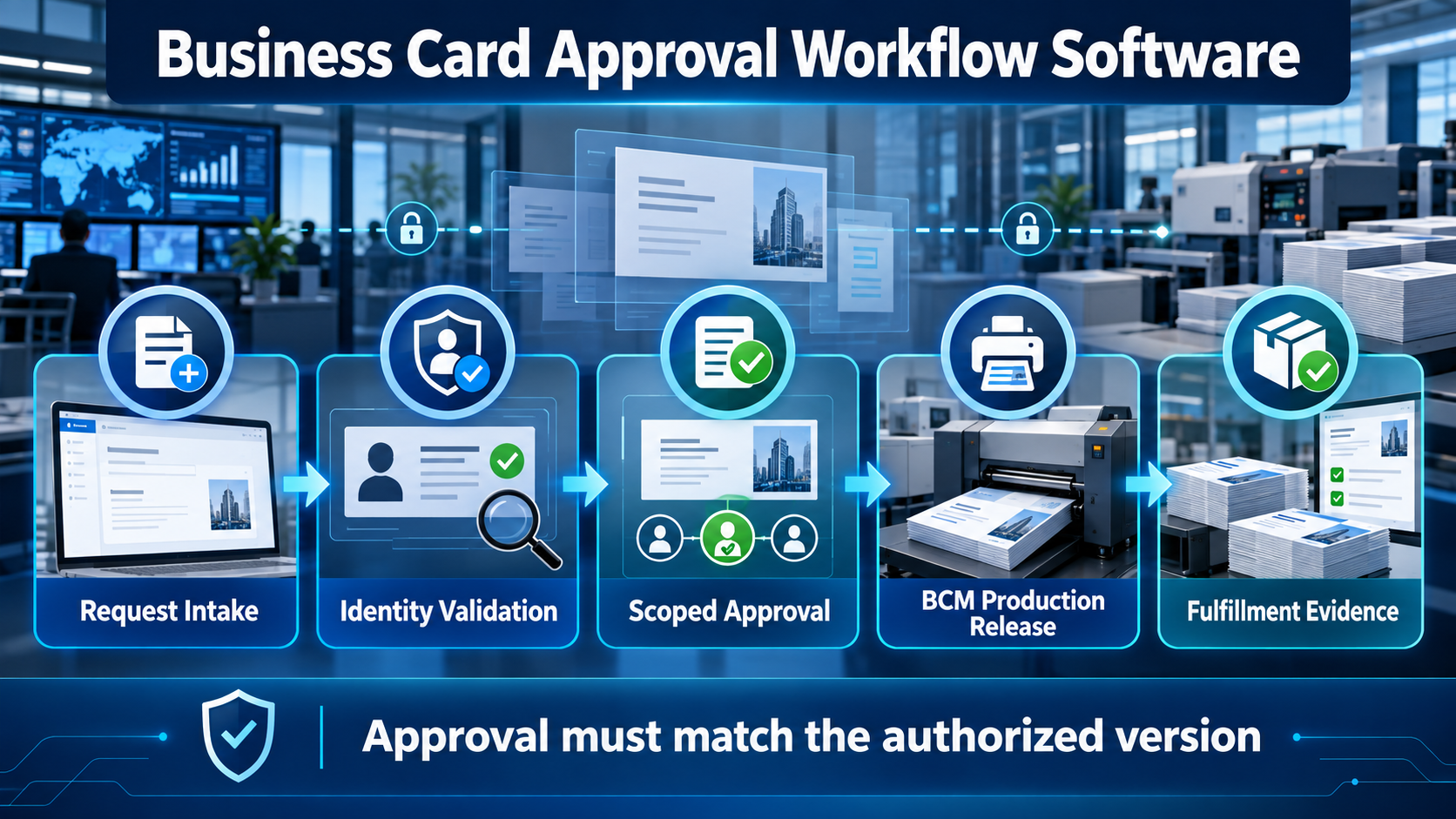
A Governed Approval Lifecycle
| Stage | Decision and control | Required evidence |
|---|---|---|
| 1 Request initiation | Identify requester, employee, order type, eligible catalog, and authoritative source context. | Requester, employee key, source, timestamp, and policy version |
| 2 Identity validation | Resolve approved public identity, template, language, legal line, credentials, and exceptions. | Field provenance, identity version, template version, and exception result |
| 3 Scoped approvals | Route business, brand, quantity, commercial, and local reviews according to authority. | Approver, scope, decision, reason, delegation, and expiry |
| 4 Production release | Freeze the authorized specification and transmit the controlled order to BCM. | Release actor, immutable specification, order ID, and release time |
| 5 Outcome reconciliation | Return production, shipment, delivery, cancellation, failure, and reprint events. | Status history, tracking, owner, resolution, and final outcome |
Each stage answers a different question. The workflow should let auditors and support teams reconstruct the path without interpreting free-form email. It should also give employees a simple experience: request, review the approved rendering, respond to required action, and track outcome. Governance belongs in the architecture; complexity should not be transferred to every requester.
Approval Responsibility Matrix
| Participant | Primary responsibility | Must not be assumed |
|---|---|---|
| Employee or delegate | Submit the need, confirm permitted contact details, and respond to proof or correction tasks. | Authority to approve every public identity or commercial exception |
| Manager | Confirm role-related need, population, timing, or quantity within delegated authority. | Ownership of brand standards, procurement policy, or production release |
| Marketing or identity owner | Approve public presentation, template eligibility, and defined brand exceptions. | Commercial authorization or employee-status authority |
| Procurement or Finance | Validate cost center, thresholds, PO, pricing context, and purchasing policy. | Approval of public title, credentials, or artwork meaning |
| CCA where deployed | Govern approved identity, template, quantities, and exception decisions. | Physical production, delivery, or BCM transaction execution |
| BCM | Execute the authorized order as the contracted vendor and preserve production and fulfillment evidence. | Permission to invent identity policy or bypass required authorization |
| BOC where used | Coordinate cross-system exceptions, ownership, and reconciliation. | Replacement of the authoritative decision or contracted execution record |
Integration Architecture and Data Contracts
Approval workflow software becomes enterprise infrastructure when it connects to HCM, directory, CRM, ERP, procurement, identity, service-management, and reporting environments. The integration contract should define objects, fields, identifiers, events, authentication, permissions, validation, idempotency, retries, rate limits, versioning, reconciliation, retention, and support ownership. A connector logo does not establish that the required transaction is implemented.
Event design should accommodate employee lifecycle changes. A future-dated promotion may require a card to be prepared but not released before its effective date. A location change may alter template, address, language, tax, or delivery rules. A departure may cancel open work. Duplicate events should not create duplicate orders. When a source is unavailable, the workflow should fail safely, queue work where appropriate, and make the unresolved authority visible.
The approval record should travel through the transaction by stable reference rather than by copying every detail into every system. BCM needs the authorized specification and commercial context required for execution, not the complete employee record. Status returned from BCM should reconcile to the originating request so that approvals, order state, shipment, and exception ownership remain aligned.
Audit Evidence Without Administrative Overload
Useful evidence captures the actor, role, scope, source, timestamp, decision, reason, data version, template version, delegated authority, expiry, release, order identifier, status history, and outcome. It should distinguish system decisions from human decisions and routine processing from exceptions. Reports should answer who approved what and why without forcing teams to search multiple inboxes.
Retention should be deliberate. The enterprise may need transaction evidence for operational, contractual, financial, or compliance purposes, but should not retain unrelated employee data merely because it was available upstream. Access, export, deletion, legal hold, and regional requirements should be defined with Security, Privacy, Legal, Records, and Procurement stakeholders.
Operational Metrics That Reveal Workflow Quality
Approval speed alone is an incomplete measure. A fast workflow can still approve incorrect identity or create expensive rework. Enterprises should track time by stage, straight-through processing rate, approval expiry, reassignment, exception type, rework cause, first-pass proof acceptance, duplicate prevention, production-release latency, cancellation success, reprint cause, delivery performance, invoice match rate, integration recovery, and support resolution.

Metrics should be segmented by entity, brand, region, request type, approver group, and exception category where permitted. The purpose is to improve the operating model, not rank individual approvers without context. A recurring delay may indicate an unclear policy, missing delegate, poor source data, or an unnecessary approval—not a personnel problem.
Implementation Priorities
Begin with an authority map. List every decision, owner, scope, input, evidence requirement, expiry condition, escalation path, and material change that causes reapproval. Resolve overlaps before configuring software. If two functions believe they own the same field or neither owns an exception, automation will accelerate ambiguity.
Pilot a representative population rather than the easiest one. Include a standard order, delegated order, title exception, quantity threshold, future-dated employee change, invalid address, approval expiry, source-system outage, cancellation, and reprint. Confirm that every path ends with a clear owner and that the approved version matches the specification released to BCM.
Rollout should include approver training, employee guidance, administrator boundaries, service-desk diagnostics, integration monitoring, change control, and periodic access review. When policies, organizations, templates, or commercial terms change, the workflow must be updated through controlled release rather than local improvisation.
Buyer Intent Bridge
An organization is ready for business card approval workflow software when email and manual forms can no longer prove consistent authority. Common signals include multi-location ordering, repeated title exceptions, several brands or entities, delegated administration, uncertain approval ownership, reprints caused by stale data, procurement thresholds, poor shipment visibility, audit requests, or planned HCM, CRM, directory, ERP, and service-management integrations.
The buying conversation should test the complete request-to-fulfillment transaction. Business Card Manager is designed for organizations that need governed ordering, configured approvals, enterprise-system integration, controlled production, delivery coordination, and fulfillment evidence within one contracted business-card operating model. Buyers should validate current capabilities, implementation scope, security, regional coverage, service responsibilities, and commercial terms against documented requirements.
Frequently Asked Questions
What is business card approval workflow software?
It is software that routes and records the decisions required before an employee business card can be released for production. Enterprise-grade workflow distinguishes employee eligibility, public identity, template compliance, quantity, commercial authorization, production release, and fulfillment status instead of treating approval as one generic step.
Is Business Card Manager the business card vendor
Yes. Business Card Manager is the contracted business-card vendor, ordering system, and execution platform. BCM converts the authorized specification into a controlled order and manages production, delivery, and fulfillment evidence. It should not be described as software that selects another business-card vendor.
Can approvals be automated?
Standard requests can support straight-through processing when eligibility, identity, template, quantity, and commercial rules are satisfied. Exceptions should route to the appropriate authority. Automation should implement documented policy and preserve evidence rather than eliminate necessary accountability.
Can approval workflow integrate with HCM CRM and procurement systems?
Configured API-connected workflows can use approved context from enterprise systems when the data contract, permissions, authority model, security controls, event behavior, and support ownership are defined. The exact integration scope should be validated for the proposed implementation; a general platform relationship should not be presented as an unverified native connector.
Does a print portal provide the same workflow control
Some portals offer useful approval and ordering capabilities, but products differ. Buyers should verify scoped roles, conditional routing, identity authority, delegation, expiry, rework, procurement control, integration depth, production status, exception ownership, and audit evidence rather than infer capability from the word approval.
Build a Governed Approval Workflow With BCM
Map your employee populations, identity fields, templates, approval authorities, commercial rules, production-release conditions, integrations, exceptions, and evidence requirements. Then test the complete transaction with Business Card Manager as the contracted business-card vendor and ordering platform. Request a BCM workflow and integration demonstration at https://www.businesscardmanager.com/