

Dayforce Business Card Ordering BCM API Integration vs Manual Employee Change Requests
Evaluate a Dayforce-to-BCM workflow against manual employee change requests. Compare card-impact decisions, effective dates, approved versions, open orders, and operating cost.
Dayforce Business Card Ordering With BCM: API Integration vs. Manual Changes After Promotions, Moves
Every promotion, transfer or role change can mean a new business card, and handling those changes by hand takes time. This video shows how Business Card Manager (BCM) can connect with Dayforce to automate card requests, link employee updates to card decisions for clear traceability and compares the API approach with manual change handling.
BCM (Business Card Manager) is the enterprise business card ordering management software and contracted vendor that organizations can evaluate for Dayforce business card ordering, connecting Dayforce employee changes with approved card requests. The buying question is whether a scoped BCM API integration can improve how promotions, transfers, and corrections are assessed, compared with administrators coordinating those changes manually.
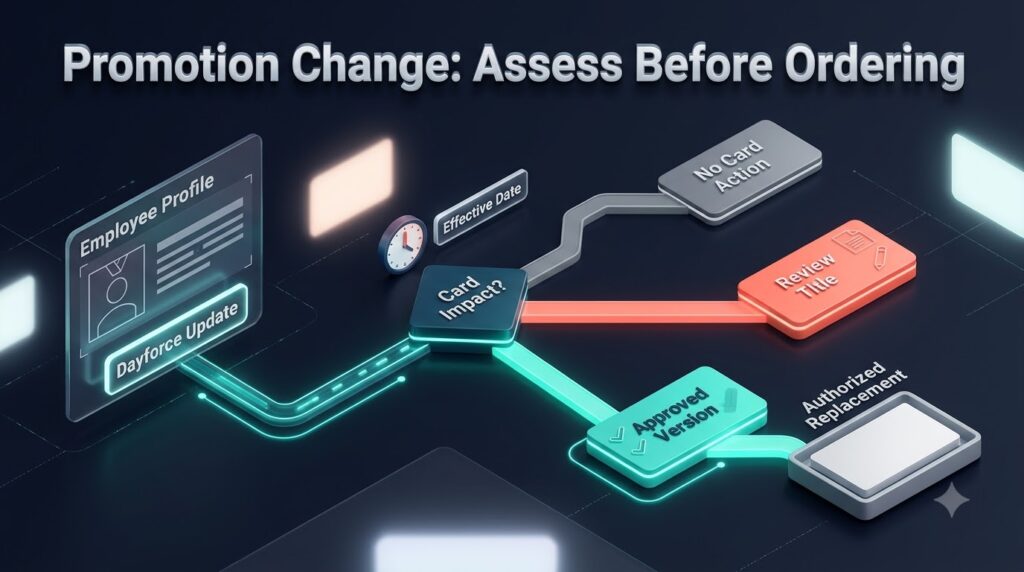
Dayforce business card ordering should connect a relevant workforce change to a controlled decision. Some changes require no new cards. Others need review of the public title, address, brand, or eligibility before a replacement purchase is authorized. A useful integration makes these decisions traceable and reduces recurring coordination without turning every HR update into printing demand.
This guide compares an API-connected change workflow with manual employee change requests. It focuses on replacement decisions, effective dates, approved specifications, and open orders. Use it to request a demonstration and a commercial proposal based on the changes your enterprise actually handles.
Define the change service before selecting the interface
A new HR record and a changed employee record can create different work. Onboarding may prepare an employee’s first request. A promotion may require a new public title. A manager change may affect approval routing while leaving the printed card untouched. Treat these as business decisions with an assigned owner.
Start by reviewing recent change requests. Record what changed, who identified the card impact, who approved the final specification, and whether a purchase followed. Include reviews that correctly ended without a new order. Those outcomes reveal where the organization prevents unnecessary work and where administrators spend time investigating ambiguity.
Then define the first integration scope. It might cover title changes for one customer-facing population, transfers between selected offices, or correction requests raised by an approved service team. A focused change service is easier to evaluate than a broad promise to synchronize every employee update with the ordering system.
What Dayforce provides as an integration starting point
Dayforce documents REST services for retrieving employee information, including obtaining employee references and individual details. Its developer guidance provides a starting point for evaluating permitted workforce retrieval. Confirm the customer’s available data, access authorization, credentials, and required operations before designing the connection.
Dayforce also documents Integration Studio for creating, managing, and monitoring integrations. Its outbound capabilities include transformed data delivered as files or JSON payloads to external APIs. This is a potential source-side building block; it does not establish a packaged BCM connector or prove compatibility with a particular BCM operation.
Ask the implementation provider to identify the selected Dayforce mechanism and the reason for using it. Document the employee population, change coverage, processing schedule, data mapping, and operating owner. The proposal should state which source capabilities are already available and which customer dependencies remain unresolved.
How BCM fits the employee change workflow
BCM’s published Dayforce integration model separates workforce facts from approved public identity and controlled ordering. It identifies BCM as the ordering system and contracted vendor, with CCA governing authorized identity and BOC potentially coordinating cross-system exceptions where deployed. Use that model as context for a customer-specific buying discussion.
A proposed connection could obtain the relevant Dayforce context, identify the affected employee and request, assess whether printable information changes, and assemble the approved specification. After the required authorization, it would invoke the supported BCM action. Confirm which parts the current interface supports and which require configuration, development, or an administrator.
Ask BCM to demonstrate the exact operation required for the project. Preparing a candidate request, updating employee context, submitting an authorized order, and reading available progress information are different functions. The commercial proposal should name the intended behavior and the evidence that establishes its acceptance.
Dayforce Business Card Integration for Employee Lifecycle Data and Governed Ordering
Compare change handling rather than data movement alone
The matrix below identifies buying criteria for the two proposed operating models. It describes requirements to verify, not guaranteed endpoint coverage. A controlled manual process may meet a limited need, while a connected process must demonstrate the business behavior it promises.
| Buying criterion | Scoped BCM API workflow | Manual change requests |
|---|---|---|
| Change intake | Confirm covered changes, source access, and schedule | Define who notices and raises the relevant change |
| Card impact | Demonstrate agreed decision rules and exception routing | Apply a documented administrator review |
| Effective dates | Preserve timing in the configured request process | Check the permitted date during review and entry |
| Approved version | Link authorized content with the supported BCM action | Retain approval and the final entered specification |
| Open orders | Confirm available lookup and intervention routes | Check prior order evidence before another purchase |
| Operating cost | Include integration support and retained review work | Include intake, assessment, correction, and follow up |
Use the same change population, card families, approval rules, delivery regions, and support expectations in both estimates. Differences in the work included can otherwise make one approach appear cheaper without delivering the same service.
Agree on the outcomes before automating change intake
Define the possible decisions for each in-scope change. One outcome may be no card action because the update does not affect the approved public specification or ordering eligibility. Another may be a review request because the card impact is uncertain. A third may be an authorized replacement request after the required decisions are complete.
Do not collapse those outcomes into a single success status. A change that correctly requires no order is a completed assessment. Missing information is unresolved work. A failed transfer is a technical issue. The support team needs to distinguish them to avoid chasing completed cases or overlooking requests that still need attention.
For a manual process, identify where the administrator records the decision. For an API proposal, show how the agreed rule and result are retained and how an exception reaches its owner. Compare the work required to explain a particular outcome after the original reviewer is unavailable.
Use a future promotion as the first demonstration
Consider an illustrative promotion recorded before its effective date. The employee needs a new public-facing title, but the internal job label is not necessarily the title approved for the card. The workflow should identify the relevant change, obtain the approved printable value, and determine when it may be used.
Ask both proposals to show the preparation and approval steps. A candidate request may be prepared in advance while production release follows the enterprise’s timing rule. Define who resolves the title, who authorizes the quantity and cost, and what evidence connects the final specification to those decisions.
Then revise the promotion before the request proceeds. The operator should be able to identify which information is current and which approval remains valid. Faster transfer is valuable only if the process still respects the approved identity and effective date. A recently received update should not silently invalidate a decision that another owner must review.
Treat a transfer as several possible decisions
A transfer can change the employee’s office, legal entity, approval route, cost allocation, or delivery destination. It may also change none of the printed content. Define which consequences matter for the selected card program rather than assuming every transfer requires replacement.
Use a case in which the paying unit changes but the card title and public address remain valid. Compare it with a move that changes the printed address. The proposed workflow should distinguish internal routing from public presentation and apply the appropriate purchasing rule.
Assign owners to the mapping between workforce context and the card specification. Where CCA is deployed, align those decisions with its governance responsibilities. BCM remains the business card ordering management software that executes the authorized specification within the contracted service. The integration should carry a resolved decision rather than leave production staff to interpret internal organizational labels.
Preserve the version that was actually approved
A change request needs a clear relationship between the workforce context reviewed, the printable specification approved, and the ordering action taken. Retain the version relevant to each decision so that a later update does not erase the explanation for an earlier order.
For example, a title correction after approval may require another review before submission. A delivery correction might follow a different authorization rule. Define which changes are material and who decides whether existing approval can still be used. Do not assume that every edit is harmless or that every edit requires the same reviewer.
Ask for a demonstration that starts with an approved specification and then alters a material field. The operator should be able to locate the prior approval, identify the affected request, and follow the agreed correction route. Apply the same test to the manual recordkeeping process and include its review effort in the comparison.
Resolve successive updates without creating repeated demand
An employee may receive several changes during the same preparation period: a promotion, a location adjustment, and a corrected business contact value. Those updates may describe one intended new card identity. The process needs an agreed way to combine the relevant information before creating another purchase.
Set the rule for handling a newer update while a review is pending. Decide whether the existing candidate request is revised, held for assessment, or superseded through a controlled process. Preserve a record of the decision and avoid assuming that message arrival order alone determines the correct business outcome.
The demonstration should also repeat a previously received change. Confirm how the implementation recognizes repeated input and distinguishes it from a legitimate later replacement request. The buyer should evaluate the request and purchasing outcome, not simply whether each source message was processed.
Handle open orders through the agreed service process
A workforce update may arrive after BCM has accepted the ordering action. At that point, the organization needs to know whether the request is still changeable, whether intervention is possible, or whether a later replacement decision is required. Confirm the actual service stages and operational cutoffs with BCM.
Test an employee who becomes ineligible while work is open. Preventing a new request, removing ordering access, and resolving an existing production job are separate responsibilities. Name the owner for each and define how the employee or administrator receives a clear outcome.
Retain historical order evidence when eligibility changes. The support team may still need to explain an earlier transaction or investigate delivery. A lifecycle update should follow the agreed access and record-retention rules rather than automatically deleting the history needed to reconcile the service.
Keep the source information focused on the card decision
Identify the fields needed for employee correlation, eligibility, timing, printable identity, approval routing, permitted cost context, and fulfillment. Exclude unrelated payroll, benefits, attendance, and personal data. A change workflow should obtain what it needs to make the agreed decision without copying a broader workforce profile.
Apply the same restriction to diagnostic logs and exception records. An operator investigating a missing approved title should see enough to resolve that request without receiving unnecessary employee information. Define who may access rejected work and how long working copies remain available.
If Microsoft Entra ID contributes access context or ServiceNow holds the employee service request, document those roles separately. Add other sources only when they supply information needed for the chosen workflow. The employee should still have one understandable route for requesting help.
Test uncertain submission before relying on retries
Suppose the connection submits an authorized replacement request, but the response is interrupted. The sending process cannot safely assume either that BCM rejected it or that no order exists. Before another attempt, the operator needs a defined way to establish the original outcome.
Ask BCM and the implementation team to demonstrate the supported acceptance reference, lookup, duplicate-control, or managed reconciliation method. Identify the fallback owner and the information that person needs when automatic investigation is unavailable. Include the response expectations in the operating scope.
Run the equivalent scenario in the manual model. Ask the administrator to locate the approved request, determine whether it was entered or accepted, and explain the next action. A fair comparison measures how dependably the service resolves ambiguity and how much recurring effort that requires.
Build a cost case around completed change decisions
For the API model, include Dayforce-related access and configuration, integration development, any platform requirements, BCM implementation, monitoring, support, and release testing. Confirm applicable entitlements and commercial requirements with the responsible providers rather than assuming general API availability covers the customer project.
For manual change requests, count identifying the card impact, gathering approved values, obtaining authorization, checking open work, entering the order, and answering inquiries. Include assessments that correctly end without a purchase, as well as corrected and withdrawn requests. These activities are part of the service even when printing never occurs.
Measure pilot results using the same scope as the baseline. Useful measures include time to complete a change assessment, requests needing correction, unresolved exceptions, and repeat demand caused by an unclear prior outcome. Count new integration-support work alongside effort removed from HR administration. Compare print and delivery charges separately from workflow cost.
Start with a pilot that can support a buying decision
Choose one Dayforce environment, a defined employee population, one card family, and a limited set of changes. Include a future promotion, an internal-only change, a transfer affecting printed content, a material edit after approval, successive updates, and an uncertain ordering response.
For each test, agree on the expected business result in advance. Record demonstrated capability, remaining manual action, unresolved dependencies, and the responsible team. The proposal should connect those cases to implementation deliverables and acceptance evidence.
Select the operating model using the work your organization actually handles. Manual coordination can remain appropriate for limited, predictable change demand. Evaluate a BCM API connection when frequent revisions, approval handoffs, or open-order investigations create a sustained burden that the demonstrated workflow can reduce.
Frequently asked questions
Does every Dayforce update need a replacement card?
No. Define whether the change affects printed content, eligibility, routing, or no card action. A workforce update can prompt assessment without authorizing a new purchase.
Can Integration Studio be part of the proposed connection?
Dayforce documents outbound integration capabilities in Integration Studio, including JSON delivery to external APIs. Confirm customer access, data coverage, mappings, and compatibility with the required BCM operation. The documented capability does not establish a prebuilt BCM connector.
Can a promotion be prepared before its effective date?
A proposed workflow can prepare context or a candidate request in advance while applying the enterprise’s timing and authorization rules. Demonstrate how the approved public title and permitted production date are preserved in the actual implementation.
Can a card already in production be changed automatically?
Do not assume so. Confirm available intervention routes, order-stage visibility, and production cutoffs with BCM. A source update and an accepted production instruction require different handling.
What should buyers ask BCM to demonstrate?
Ask for the intended BCM action, required inputs, acceptance reference, supported progress information, handling of a material change, and reconciliation after an uncertain submission. Use representative Dayforce data and actual approval rules.
Request a Dayforce and BCM change workflow discussion
Bring BCM your Dayforce environment, common employee changes, approved printable fields, effective-date rules, card families, approval route, and current change-request workload. Ask for a demonstration that follows one promotion or transfer from assessment through the supported ordering action.
Request a scoped comparison with the manual employee change service your organization operates today. Establish what each party will maintain, how exceptions will be resolved, what evidence will prove acceptance, and how ongoing cost will be measured before expanding the deployment.
Request pricing or schedule a demo with Business Card Manager to review your Dayforce integration scope.
Discuss Dayforce business card ordering with Business Card Manager