

Business Card Manager vs MOO vs Vistaprint Corporate: Enterprise Business Card Workflow Comparison
Introduction
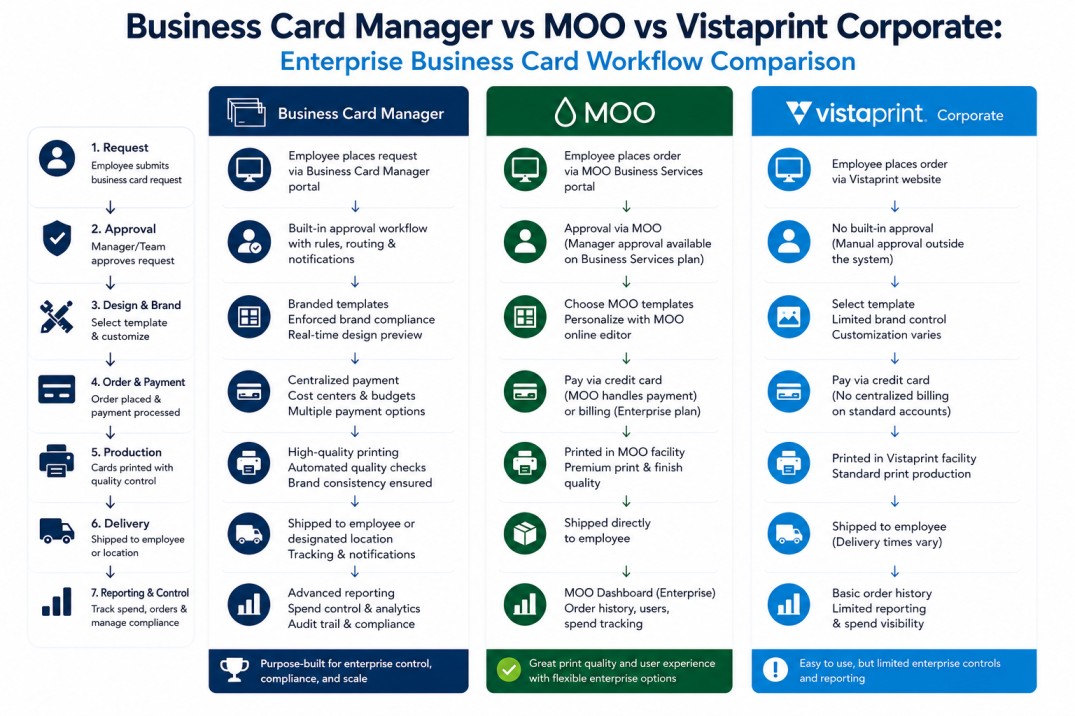
Business Card Manager, MOO, and Vistaprint Corporate can all support business card ordering workflow for organizations, but they are not built around the same operating model.
For individuals and small businesses, business card buying decisions often focus on design options, paper quality, turnaround time, price, and convenience.
For medium and large organizations, the evaluation is different.
Enterprise teams need to manage business card workflows across employees, departments, locations, approval structures, brand standards, procurement controls, vendor relationships, reporting needs, and enterprise systems.
That is where the distinction becomes important.
MOO and Vistaprint Corporate are strong business printing and ordering platforms. MOO is especially known for premium print quality, design services, templates, invoicing, account support, and enterprise print services. Vistaprint Corporate is positioned around branded products, private storefronts, corporate pricing, bulk uploads, auto reorder, and corporate print ordering.
Business Card Manager is different.
Business Card Manager is built around API-connected business card workflow infrastructure, centralized ordering, approval workflows, operational visibility, procurement coordination, enterprise Business Card Manager integrations, and governed execution across teams, departments, and locations.
This comparison explains the difference.
Quick Summary
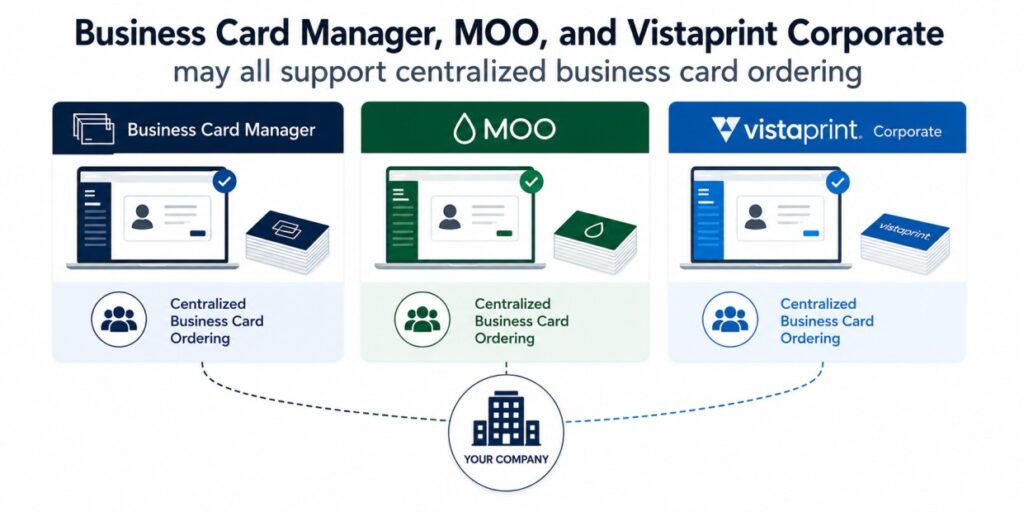
Business Card Manager, MOO, and Vistaprint Corporate may all support centralized business card ordering, but the workflows are fundamentally different.
Business Card Manager is built for enterprise business card governance workflow infrastructure, API integration, centralized ordering, approval routing, procurement visibility, and operational control.
MOO is strong for premium print quality, polished templates, design support, and managed business printing programs.
Vistaprint Corporate is strong for cost-efficient corporate print programs, private branded storefronts, branded products, and large-scale print ordering.
The right choice depends on what the organization needs.
If the priority is premium design and print quality, MOO may be a strong fit.
If the priority is corporate print cost efficiency and broad branded product ordering, Vistaprint Corporate may be a strong fit.
If the priority is API-integrated enterprise business card governance workflow infrastructure, HRIS or CRM-connected employee data, approval routing, operational visibility, vendor flexibility, reporting, and enterprise control, Business Card Manager is built for that operating model.
Comparison at a Glance
| Capability | Business Card Manager | MOO | Vistaprint Corporate |
|---|---|---|---|
| Primary model | API-connected business card workflow infrastructure | Premium business printing and enterprise print services | Corporate print and branded product ordering |
| Best fit | Medium and large organizations needing centralized ordering, approvals, integrations, and workflow control | Teams prioritizing premium print quality and design support | Teams prioritizing cost-efficient corporate print and branded product ordering |
| Identity sync | Designed for HRIS, CRM, ERP, SSO, API, and proprietary system connectivity | Typically profile, template, account, or manual data workflows | Typically portal, account, storefront, or manual data workflows |
| API integration | Core differentiator | Limited or dependent on program structure | Limited or dependent on corporate program structure |
| Approval workflows | Designed for conditional, multi-step, enterprise workflows | Business account approval capabilities may be available | Corporate account approval capabilities may be available |
| Template governance | Field-level controls, brand standards, role-based rules | Strong template and design controls | Corporate template and branded product controls |
| Vendor routing | Vendor-flexible workflow model | MOO production network | Vistaprint production network |
| Procurement visibility | Cost centers, reporting, approval controls, and order-level visibility | Account and invoicing support may be available | Corporate pricing, storefront, invoicing, and account support may be available |
| Operational visibility | Workflow, approval, vendor, and reporting visibility | Order and account visibility | Order and account visibility |
| Enterprise systems fit | Designed for connected enterprise environments | Strong print services fit | Strong corporate print procurement fit |
Important Note About This Comparison
This comparison is based on publicly visible positioning and typical platform architecture patterns. Specific capabilities may vary by product edition, account configuration, customer implementation, or service agreement.
The point is not that one platform is universally better than the others.
The point is that each platform is built around a different operating model.
Business Card Manager is strongest when business card workflows need to be governed, integrated, routed, approved, tracked, and connected to enterprise systems.
MOO is strongest when organizations prioritize premium print quality, design support, and managed print services.
Vistaprint Corporate is strongest when organizations prioritize corporate print ordering, branded products, private storefronts, and cost-efficient production.
1. Identity Sync
Identity sync determines how employee data enters the business card workflow.
For enterprise organizations, this is a major issue. Employee names, titles, phone numbers, departments, cost centers, territories, managers, locations, and role changes often live across HRIS, CRM, ERP, directory, procurement, and proprietary systems.
Business Card Manager
Business Card Manager is designed around enterprise identity and workflow connectivity. Also, business card workflows can be connected to HR, CRM, ERP, SSO, procurement platforms, API environments, and proprietary business systems.
This allows employee data to flow into the business card workflow through governed rules instead of manual re-entry.
Examples include:
- HRIS-driven employee data
- CRM-connected sales identity fields
- cost center and department data
- manager and approval routing data
- location and regional business rules
- title, phone, and role updates
- proprietary backend data
- SSO and access-control environments
This is where Business Card Manager is strongest.
MOO
MOO offers business printing services, enterprise plans, templates, design support, account management, and ordering capabilities. For many organizations, this can support a managed print workflow.
However, MOO is generally positioned around print services, templates, design support, account management, and ordering rather than identity-driven API governance.
Vistaprint Corporate
Vistaprint Corporate is generally positioned around corporate print programs, branded products, custom storefronts, and business printing support.
That can be useful for organizations that need print procurement and branded product ordering, but it is different from an identity-driven workflow model where employee data is automatically governed through enterprise systems.
Takeaway
For simple or print-led ordering, MOO and Vistaprint Corporate may be strong options.
For organizations that need business card data connected to employee identity systems, Business Card Manager is built around the stronger workflow infrastructure model.
2. Role-Based Access
Role-based access determines who can order, edit, approve, or manage business cards.
Business Card Manager
Business Card Manager supports role-driven ordering and governance. Access can be structured around users, departments, cost centers, locations, approval levels, brand permissions, administrative roles, and enterprise policy rules.
This is important for larger organizations because different groups may require different templates, approval paths, languages, brands, regions, or compliance rules.
Business Card Manager’s advantage is that permissions can be connected to the operational workflow model, rather than managed only as static user groups.
MOO
MOO business accounts can support templates, users, account structures, and enterprise print services. This can work well for organizations that need managed ordering and professional print support.
However, the model is generally more print and account oriented than identity-automation oriented.
Vistaprint Corporate
Vistaprint Corporate can support corporate print ordering and branded product programs. It is generally useful for organizations that need a controlled corporate ordering environment.
However, the role-based governance model is generally different from a system that uses identity attributes, API-connected workflows, and conditional approval routing as the foundation.
Takeaway
Business Card Manager is better suited for organizations that need access control tied to enterprise identity, roles, departments, locations, approval rules, procurement needs, and workflow visibility.
3. Template Selection and Governance
Template governance determines how business card designs are selected, controlled, and enforced.
Business Card Manager
Business Card Manager is built around governed templates. Organizations can control:
- approved business card designs
- editable and locked fields
- brand standards
- legal or compliance text
- location-specific formats
- department-specific templates
- regional language variations
- role-specific rules
- approval requirements
- business unit or brand variations
This allows the organization to preserve brand consistency while still supporting distributed employee requests.
MOO
MOO is strong in print quality, design presentation, and template-driven ordering. For organizations that prioritize premium card design and polished presentation, MOO is often a strong fit.
MOO may be a better fit when the main priority is visual design quality and premium print execution.
Vistaprint Corporate
Vistaprint Corporate is strong for broad branded product ordering and corporate print programs. It can support controlled storefront-style ordering for business cards and other marketing materials.
It may be a good fit for organizations that need cost-efficient access to branded print materials.
Takeaway
MOO may have the strongest premium design and print reputation.
Vistaprint Corporate may be strong for cost-efficient corporate print programs.
Business Card Manager is strongest when template governance must be connected to ordering rules, approval workflows, departments, cost centers, locations, and enterprise systems.
4. Auto-Population
Auto-population determines how business card fields are filled before approval and production.
Business Card Manager
Business Card Manager is designed to auto-populate card fields from governed enterprise data sources.
Fields can include:
- employee name
- title
- department
- location
- phone number
- office address
- territory
- cost center
- manager
- brand or division
When integrated with systems such as HRIS, CRM, ERP, SSO, procurement platforms, or proprietary databases, Business Card Manager can reduce manual entry and improve data consistency.
MOO
MOO can support saved profiles, templates, and account-managed ordering workflows. This can reduce repeated manual entry for many users.
However, this is generally different from a fully identity-driven governance model where the authoritative source is an enterprise system.
Vistaprint Corporate
Vistaprint Corporate can support corporate ordering programs and storefront-style workflows where users select or customize approved products.
That model may work well for simpler corporate print programs, but it is not the same as employee lifecycle-based data synchronization.
Takeaway
Business Card Manager is strongest when the organization needs business card data to stay aligned with employee identity data across HR, CRM, ERP, procurement, SSO, and proprietary systems.
5. Policy Validation
Policy validation prevents bad, outdated, or non-compliant business cards from moving through the workflow.
Business Card Manager
Business Card Manager supports governance rules that can validate:
- required fields
- title formatting
- phone formatting
- legal disclaimers
- brand standards
- approved templates
- location-specific requirements
- department-specific rules
- cost center requirements
- approval routing conditions
- workflow exceptions
This allows organizations to enforce policy before cards are produced.
MOO
MOO supports business print programs and template controls. That can help organizations keep brand presentation consistent.
However, Business Card Manager provides a deeper workflow governance tied to employee data, approval rules, policy logic, and operational infrastructure.
Vistaprint Corporate
Vistaprint Corporate can support corporate print ordering and branded product programs. This can help companies maintain consistent ordering and branded product access.
However, enterprise policy enforcement across identity data, approval structures, procurement rules, and operational workflows is a different category.
Takeaway
The developers built Business Card Manager for enterprise policy validation across business card workflows, not just print design control.
6. Approval Workflow
Approval workflow determines who must review and approve business card orders before production.
Business Card Manager
The designers created Business Card Manager for enterprise approval workflows.
You can structure approval routing around:
- department
- manager
- cost center
- location
- region
- role
- brand
- exception rules
- procurement requirements
- compliance requirements
This helps organizations support complex approval structures across distributed teams.
MOO
MOO business account features may support approval workflows and managed ordering processes. That can work well for organizations with simpler approval needs or print-led account structures.
Vistaprint Corporate
Vistaprint Corporate may support corporate ordering controls and approval-style workflows depending on the program configuration.
Takeaway
MOO and Vistaprint Corporate may be useful for business printing programs with controlled ordering.
Business Card Manager is stronger when the organization needs conditional approval logic, cost-center-aware routing, identity-driven rules, and enterprise workflow governance.
7. Print Routing
Print routing determines where the business card job goes after approval.
Business Card Manager
Business Card Manager supports vendor-flexible execution. The workflow can support routing to approved print vendors, internal print facilities, regional suppliers, or other fulfillment partners depending on the organization’s needs.
This matters for enterprises with:
- regional print requirements
- multiple countries
- procurement-approved vendors
- internal production teams
- local fulfillment rules
- cost or shipping considerations
- vendor redundancy requirements
MOO
MOO generally routes production through MOO’s own print and fulfillment environment.
This can be a strength when the organization wants MOO’s premium print quality and service model.
Vistaprint Corporate
Vistaprint Corporate generally routes production through Vistaprint’s corporate print and fulfillment model.
This can be a strength when the organization wants a standardized corporate print supplier and cost-efficient branded product ordering.
Takeaway
Business Card Manager is strongest for organizations that need vendor flexibility and procurement-aligned routing.
MOO and Vistaprint Corporate may be strong when the organization wants to standardize around one print provider.
8. Production and Shipping
Production and shipping still matter, but they are not the only enterprise requirements.
Business Card Manager
Production speed and quality depend on the selected vendor or fulfillment model. The advantage is flexibility. Business Card Manager can support the workflow, governance, and routing layer while allowing organizations to use approved production resources.
MOO
MOO is strong for premium print quality, polished business card presentation, and design-driven print experiences.
Vistaprint Corporate
Vistaprint Corporate is strong for cost-efficient business printing, corporate print ordering, and broad branded product programs.
Takeaway
MOO may be strongest for premium print quality.
Vistaprint Corporate may be strongest for cost-efficient corporate print procurement.
Business Card Manager is strongest when production must sit inside a governed, integrated, multi-system workflow.
9. Audit and Reporting
Audit and reporting determine how much visibility administrators have into what is happening.
Business Card Manager
Business Card Manager supports enterprise visibility across:
- requests
- approvals
- users
- departments
- locations
- cost centers
- vendors
- order history
- exception activity
- lifecycle changes
- reporting data
This is important for procurement, HR, operations, finance, and brand governance teams.
MOO
MOO business accounts can support account and order visibility, which may be sufficient for many print programs.
Vistaprint Corporate
Vistaprint Corporate can support corporate ordering and account visibility, which may be useful for print procurement and branded product programs.
Takeaway
Business Card Manager is strongest when reporting needs to connect with governance, approvals, employee data, cost centers, procurement activity, and enterprise operations.
Final Summary
Business Card Manager, MOO, and Vistaprint Corporate are not the same type of solution.
They may overlap around business card ordering, but the operating models are different.
Business Card Manager
Best for organizations that need:
- API-connected business card workflow infrastructure
- centralized ordering
- HRIS, CRM, ERP, procurement, SSO, or proprietary system connectivity
- approval workflow governance
- template controls
- procurement visibility
- auditability
- vendor flexibility
- operational reporting
- enterprise-scale business card management
MOO
Best for organizations that need:
- premium print quality
- polished business card design
- strong template presentation
- business printing services
- account support
- managed print ordering
Vistaprint Corporate
Best for organizations that need:
- cost-efficient corporate print ordering
- branded products
- private storefronts
- digital storefront-style procurement
- broad print and promotional product support
- corporate print account services
Which Platform Is Best?
The answer depends on the organization’s priority.
| Priority | Best Fit |
|---|---|
| API-connected business card workflow infrastructure | Business Card Manager |
| HRIS or CRM-connected employee identity workflows | Business Card Manager |
| Complex approval workflows | Business Card Manager |
| Procurement visibility and auditability | Business Card Manager |
| Vendor-flexible print routing | Business Card Manager |
| Premium print quality and polished design | MOO |
| Cost-efficient corporate print and branded products | Vistaprint Corporate |
| Simple centralized ordering | MOO or Vistaprint Corporate |
| Enterprise workflow infrastructure | Business Card Manager |
Strategic Takeaway
For individuals and small businesses, business card buying often comes down to design, paper, price, and turnaround time.
For medium and large organizations, the requirements are different.
Enterprise business card management touches employee identity, approval workflows, procurement visibility, template governance, vendor coordination, cost centers, reporting, and operational control. Enterprise business card infrastructure vs lightweight SaaS identity platforms.
That is why, consequently, organizations should evaluate business card platforms based on their operating model; furthermore, not just their print output.
MOO and Vistaprint Corporate are strong print and ordering platforms.
Business card managers compare Moo and Vistaprint Enterprise.
For companies that need business card workflows connected to HR, CRM, ERP, procurement, identity, finance, SSO, or proprietary systems, that distinction matters.
Need enterprise control over business card workflows?
Business Card Manager supports centralized ordering, approval workflows, governance controls, operational visibility, and API-connected workflow infrastructure for medium and large organizations that need business card workflows connected to existing enterprise systems.