

Microsoft Dynamics 365 Business Card Ordering BCM API Integration vs Manual CRM Requests
Evaluate BCM API integration against manual employee card requests in Dynamics 365 Sales. Compare approval evidence, repeated submissions, order follow up, and total operating cost.
Dynamics 365 Business Card Ordering With BCM: API Workflow vs. Manual Requests for Your Sales Teams.
Manual business card requests slow sales teams down and leave orders hard to track. This video shows how Business Card Manager (BCM) can connect with Microsoft Dynamics 365 to automate requests and approvals, track order status, keep employee card orders separate from customer records and set clear rules for eligibility, spending and data access.
BCM (Business Card Manager) is the business card ordering management system for enterprises evaluating how sales operations requests become approved purchases. For Microsoft Dynamics 365 business card ordering, the buying decision is whether a scoped API workflow can remove repeated administration while preserving control over what is printed, who pays, and when an order is released.
A manual CRM request process can remain practical for a small, stable ordering population. A BCM API integration becomes more compelling when regional coordinators repeatedly collect the same employee information, reconcile competing requests, and chase approvals across a distributed sales organization. Buyers should compare the work required to complete an authorized order, including exceptions and support, rather than comparing a successful API call with an email.
This article focuses on Dynamics 365 Sales and a Dataverse-based request design. Microsoft documents that Dynamics 365 Sales runs on Dataverse; other Dynamics applications require their own architecture assessment. The workflows described here are evaluation designs, not a claim that a packaged BCM connector or every proposed operation is available in a customer’s environment.
Define the ordering problem before choosing the connection
Sales operations may initiate business card requests for new customer-facing employees, a regional launch, an industry event, or a change in public contact details. Dynamics can provide a familiar place to begin the request. The organization still needs a decision about employee eligibility, approved presentation, spending authority, and delivery.
Start by examining a representative month of requests. Count how often staff re-enter details, ask for missing information, change a proof, discover an existing order, or chase an unclear status. Separate ordinary requests from urgent exceptions. A process that works for one coordinator may depend on knowledge that has never been documented and cannot be transferred reliably to another region.
The comparison should use the same population, quantities, approval requirements, and delivery expectations. Otherwise, the API option may appear cheaper because its estimate excludes administrative work that the manual team currently performs. Include the time spent deciding that no replacement card is needed, since that decision also consumes effort and can prevent unnecessary purchasing.
What Microsoft connectivity establishes
Microsoft provides a Dataverse Web API for programmatic data operations. Power Automate also supports Dataverse triggers and actions. These are technical building blocks for a customer-specific connection; they do not establish the availability of a BCM order endpoint, a specific integration entitlement, or an agreed support service.
A design could begin with an explicit employee request in an approved application and pass validated information through an integration service to a supported BCM operation. Another design might retrieve pending requests on a schedule. Choose the mechanism after confirming the application, tables, permissions, licensing, and BCM interface scope. The existence of a CRM update alone is insufficient reason to create a purchase.
BCM’s published Dynamics integration article describes CRM context feeding a governed ordering model, with CCA providing identity authority where deployed and BCM handling controlled execution. For a procurement decision, translate that model into a demonstration and written scope. Confirm which validations run in each system, which actions require human approval, and which statuses can actually be returned.
Read the BCM Microsoft Dynamics 365 integration overview
Compare the two operating models
The comparison below describes responsibilities to establish during evaluation. A manual process can apply strong controls when administrators consistently follow documented rules. An integrated process can reduce re-entry only when its mappings, approval boundaries, and recovery procedures cover the organization’s real requests.
| Buying criterion | Scoped BCM API workflow | Manual CRM requests |
|---|---|---|
| Request capture | Validate agreed fields at intake | Administrator reviews submitted details |
| Approval evidence | Associate authorization with a specification | Retain approval beside the final entered details |
| Repeat requests | Demonstrate submission tracking and duplicate handling | Check prior requests and accepted orders |
| Status inquiries | Return confirmed statuses where supported | Administrator checks BCM and updates requester |
| Exceptions | Assign monitored failures and recovery ownership | Assign incomplete requests and follow up |
| Cost basis | Implementation plus support and retained handling | Administration plus correction and coordination |
Neither option should be judged solely by its easiest case. Ask both teams to handle an incomplete request, an employee with two regional assignments, and an order that appears to have been submitted without a clear response. The strongest proposal explains who resolves each situation and how the final decision becomes visible to the requester.
Separate employee requests from customer records
Business card ordering for employees serves a different purpose from managing customer contacts or scanning cards into CRM. Specify this distinction in the project brief. A buyer searching for Dynamics business card software may encounter contact capture tools that solve a separate problem and do not address employee approvals or physical ordering.
A dedicated request record can make the proposed process easier to govern. It can identify the employee, the requested purpose, and the approved organizational context without copying customer account histories into the ordering workflow. Decide whether the requester is ordering for themselves or acting for another employee, and verify that the delegated action is permitted.
Use an employee correlation that survives display-name changes. Where a person has records in multiple environments or subsidiaries, include the relevant organization boundary. A matching name or familiar email address may be useful to an administrator but should not silently resolve an ambiguous identity. Hold the request for correction when the intended employee cannot be established.
CRM security roles and sales assignments should be evaluated for their intended use. An internal role may guide routing without becoming a printed title. Define the source of each public-facing value separately, including the source that prevails when HR, the directory, and a CRM request disagree. CCA can participate in this authority decision where it is deployed and configured for the workflow.
Design an explicit request to order boundary
An integration should distinguish a saved draft, a request awaiting approval, and an authorized submission. These states represent different business decisions. A salesperson may save a delivery address before choosing a quantity; a coordinator may prepare several requests while waiting for budget confirmation. None of those actions should be interpreted as final release without an agreed rule.
Consider a regional event. Sales operations prepares requests for eligible attendees and selects a required delivery date. The workflow checks approved content and routes the spending decision. Some employees already have enough current cards, so their requests close without purchasing. Others receive approved orders. The event itself is useful context, but the attendee list does not provide blanket authorization to print.
The manual equivalent should follow the same boundary. An administrator records the employee and purpose, confirms whether an order is required, obtains approval, and enters the final specification. This gives the buyer a fair baseline: the potential benefit of integration is reduced handling and more consistent evidence, while the commercial decision remains explicit.
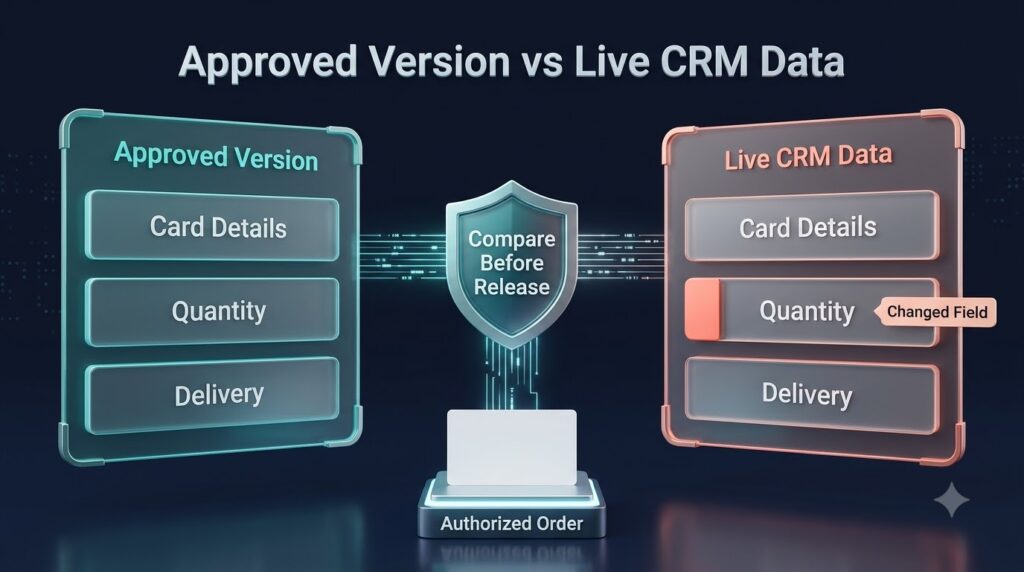
Preserve the version that received approval
An approval needs to refer to a specific card specification and purchase request. Retain the approved public details, template selection, quantity, delivery destination, and allocation information necessary to explain the purchase. The integration design should identify which material changes require approval again and which administrative corrections may proceed within existing authority.
For example, an employee may change the requested telephone number after the manager has approved the request. If the workflow later reads live CRM fields at submission time, it could send different content from the version the manager reviewed. A proposed integration should demonstrate how it prevents that mismatch. A manual administrator should compare the final entered details with the retained approval before releasing the order.
Treat request status and production status as separate information. Approval means the enterprise has authorized the specified action. It does not prove that BCM accepted an order or that production has started. Clear labels help sales operations answer a requester accurately and avoid promising delivery on the strength of an approval notification alone.
Explore BCM business card ordering governance
Prevent repeated updates from becoming repeated purchases
Microsoft documents that repeated updates to a Dataverse row can produce multiple flow runs, including updates where submitted values have not changed. The buying implication is straightforward: a technical event cannot serve as the sole evidence that another order is authorized.
Require the proposed design to associate each intended purchase with a durable request identifier. Demonstrate how the workflow recognizes a submission already in progress or already accepted. If BCM supports a suitable duplicate-prevention mechanism, confirm its precise behavior. Where it does not, establish an integration-side record and an operational reconciliation process appropriate to the supported interface.
A timeout needs particular attention. If the connection loses the response after sending an order, the outcome may be unknown. Automatically repeating the purchase could create a duplicate; automatically closing it as failed could leave an accepted order untracked. The design should show how an authorized operator checks available BCM evidence before deciding whether to retry. This requirement belongs in the implementation scope and the support procedure.
Make order follow up useful to sales operations
Buyers often ask for CRM status updates because they want fewer inquiries. Agree which statuses BCM can provide, how they are retrieved, and what each one means. A technical integration acknowledgment should not be labeled as shipment confirmation. Where tracking or production detail is unavailable, the interface should state the last verified status and the responsible contact.
An employee may move offices while a request is open. The process needs an owner who checks whether the order remains editable, whether intervention is available, and what the supplier or production stage permits. Do not assume that changing a CRM address changes an accepted order. A supported change or cancellation route must be confirmed separately from the original submission route.
For event-driven demand, show the required delivery date alongside the order’s verified position. The date may help prioritize review, but it does not establish a delivery commitment. If an urgent request falls outside normal handling, record the exception decision and any additional cost authorization rather than allowing a familiar requester to bypass controls through email.
Limit access and assign support ownership
Choose the smallest set of CRM fields required for ordering and explain why each is needed. An integration generally should not need customer opportunity values or sales correspondence to order an employee’s cards. Keep personal delivery information restricted to the people and systems that require it, with retention and access responsibilities agreed before launch.
Separate the rights to view a request, approve spending, change card content, and submit an order. A coordinator who prepares requests for one region should not gain unrestricted access to another region merely because both use the same integration. Test the service identity as well as the user-facing interface; a restricted screen does not by itself prove that the connection has appropriately limited access.
Assign support ownership across the enterprise and BCM. The CRM team may own request capture, an integration team may own failed transfers, and BCM may own the contracted ordering operations. Document the handoff for ambiguous cases, including the evidence needed to investigate. A shared queue is useful only when someone is responsible for reviewing it and can take the required action.
Compare total operating cost over the same period
A manual process has visible administration costs and less visible interruption costs. Include time spent locating approvals, correcting details, checking prior requests, and responding to status inquiries. Record these activities during a baseline period rather than estimating every request from memory. Separate avoidable reprints from legitimate replacements so the comparison does not penalize ordinary employee changes.
The integrated option should include implementation, mapping changes, licensing where applicable, monitoring, credential maintenance, and support. Ask what happens when the organization adds another environment, legal entity, or approval rule. A proposal that covers one sales population may require additional work for a new region even when the technical connection already exists.
Use a simple annual comparison: implementation and recurring support plus retained administrative handling plus exception and correction cost. Apply the same request volume and policy assumptions to both options. Faster completion can also matter to a sales team, but distinguish that benefit from savings that can be demonstrated in staff time or purchasing records.
Require a pilot that reflects real exceptions
Choose one Dynamics 365 Sales environment and a defined employee population. Start with an explicit request, one template family, and a known approval path. This narrow scope makes it easier to determine whether the connection removes administrative work without hiding unresolved ownership or content decisions.
The pilot should cover an ordinary approved request, missing employee correlation, an unauthorized delegated request, and a change after approval. It should also show a repeated submission and an uncertain technical response. Observe the final business outcome for each case, not just the flow execution history. The reviewer should be able to explain whether an order exists, which version it uses, and who can resolve any exception.
Measure completed requests, handling time, corrections, unresolved cases, and duplicate purchases over the agreed pilot period. Include requests closed without an order. Review the results with sales operations and the people responsible for ongoing support. Expand only after the team can run the process during absences and explain what happens when a connection is unavailable.
Plan additional connections with the enterprise integration roadmap
Questions enterprise buyers should resolve
Is this the same as business card scanning into Dynamics?
No. This comparison concerns ordering physical business cards for employees. Card scanning and contact capture tools help populate CRM contact information. Establish the employee ordering use case explicitly when requesting proposals or comparing software categories.
Does Power Automate make a BCM connection automatic?
Microsoft provides Dataverse automation capabilities, but a BCM connection still needs an agreed interface, authentication, field mapping, approval behavior, and support scope. Confirm licensing and supported actions for the actual environment. A general platform capability does not establish a packaged BCM connector.
Should every territory change create a replacement order?
No. Review whether the change affects printed details or purchasing eligibility. A territory adjustment may affect internal routing only. The enterprise should define when a change requires review, when replacement is permitted, and who authorizes the purchase.
When is a manual process the reasonable choice?
A documented manual process may be suitable when request volume is modest, the ordering population is stable, and administrators can retain approvals and follow up consistently. Revisit integration when repeated handling or distributed coordination creates a measurable operating burden.
What should a BCM demonstration prove?
Ask to see an employee request move through the proposed approval and submission process, with the accepted order linked to the authorized specification. Then examine a duplicate attempt and a failed or uncertain transfer. Confirm which steps are available today, which require configuration or development, and which remain operational procedures.
Request a Dynamics 365 and BCM workflow assessment
Bring a representative employee request, an approval example, and an order follow-up problem to a BCM consultation. Ask for a scoped demonstration covering Dynamics 365 Sales request capture, approved data, supported BCM actions, and recovery ownership. A useful proposal should let procurement compare the complete operating process against the manual baseline and identify what the enterprise will need to support after launch.
Request pricing or schedule a demo with Business Card Manager to review your Dynamics 365 integration scope.
Discuss Microsoft Dynamics 365 business card ordering with BCM