

Microsoft Entra ID Integration With Business Card Manager API For Governed Employee Ordering
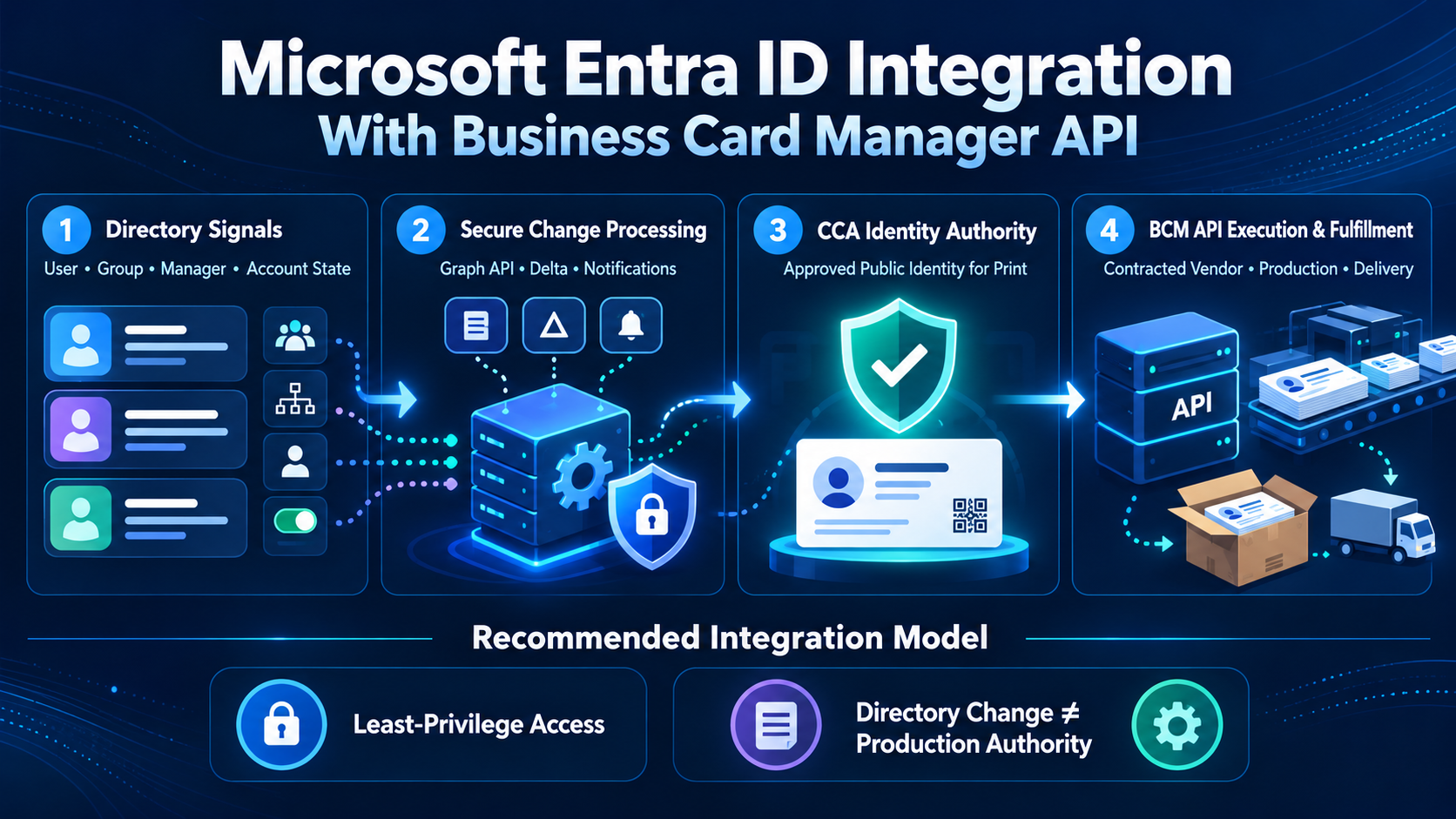
A secure architecture connecting directory identity lifecycle signals, access controls, approved public identity, and Business Card Manager order execution.
Business Card Manager (BCM) is the enterprise business card ordering system, contracted vendor, and execution platform that converts approved identity specifications into controlled orders, production, delivery, and fulfillment evidence. Microsoft Entra ID can be integrated with the Business Card Manager API through Microsoft Graph and a governed integration layer. Entra can contribute authenticated user, directory, group, manager, account-state, and lifecycle signals; Color Card Administrator (CCA) governs the public identity authorized for print; and BCM executes the approved order. Business Ops Center (BOC) can coordinate cross-system exceptions where deployed.
Microsoft Entra ID Can Support a Governed BCM API Integration
Microsoft Graph provides programmatic access to Microsoft Entra user resources and selected relationships. A properly authorized integration can read approved attributes such as display name, job title, department, office location, business phone, manager relationship, account status, and organization-specific extension data. It can also identify newly created, updated, or deleted users through delta queries and receive supported change notifications through webhooks, Event Hubs, or Event Grid.
These capabilities make Entra ID useful for business-card workflows, particularly when it already reflects workforce provisioning and access status. A new account, updated title, changed office, revised manager, group assignment, or disabled account can create a candidate action for the BCM process. The integration can reduce manual re-entry and identify changes earlier, but a directory update should not automatically become printable artwork or a production release.
The recommended architecture preserves authority boundaries. Entra ID supplies directory facts and security context. CCA validates eligibility and approves the public identity infrastructure, brand, legal line, template, and exceptions. BCM applies product, quantity, proof, production, delivery, cancellation, and reprint controls as the contracted business-card vendor. This is a configurable integration model, not a claim that a universal native Entra-to-BCM connector is currently available.
Directory Identity Is Useful, but It Is Not the Complete Employee Record
Entra ID often receives identity and lifecycle information from an HCM platform or another authoritative source. That makes it operationally valuable, but it does not make every directory property authoritative for every business purpose. Display names may be optimized for collaboration, job titles may be abbreviated, office locations may be access-oriented, and group memberships may reflect technical entitlements rather than printed-card policy.
The integration design should document where each field originates, who owns it, how quickly it is updated, and whether it is suitable for public use. If Dayforce, Workday, SAP SuccessFactors, Oracle HCM, or another HCM platform is the workforce system of record, Entra should not be treated as a replacement for that authority. Instead, the directory can provide a validated operational signal that is reconciled with CCA policy before BCM receives an executable order.
Stable identifiers are critical. The Entra object ID should be correlated with the approved employee identifier, CCA identity version, BCM request and order identifiers, and source event. User principal names and email addresses can change and should not be the only keys. Stable correlation prevents duplicate requests, supports rehires and renamed accounts, and allows administrators to reconstruct which directory state, identity approval, and order version applied.
The Governed Entra ID and Business Card Manager API Workflow
| Stage | Governed action | Required evidence |
|---|---|---|
| Directory signal | Microsoft Graph supplies an approved user change group or account state | Entra object ID source and timestamp |
| Change processing | Delta query or notification is validated deduplicated and correlated | Recoverable event and expected version |
| Identity authority | CCA approves public name title company brand contact details and template | Versioned identity specification |
| BCM API execution | Business Card Manager applies product proof production delivery and release controls | Executable order linked to approved identity |
| Lifecycle control | Disable delete or material change is compared with current order state | Hold cancel reapprove continue or replace decision |
| Evidence and closure | BCM returns production shipment delivery cancellation and reprint status | Actual outcome remains visible |
Microsoft Graph Supplies Only the Directory Data the Workflow Needs
Microsoft Graph user resources can expose many properties, but only a subset is returned by default and additional properties generally require an explicit select query. That behavior supports a strong data-minimization design: request only the fields needed for eligibility, identity review, approval routing, and transaction correlation. Broad directory reads should not be adopted merely because they are technically available.
A typical payload might include the Entra object ID, account-enabled status, display name, approved work email, job title, department, office location, business phone, manager reference, tenant or company context, and carefully governed extension attributes. The precise list depends on the customer policy and data authority map. Personal email, authentication methods, sign-in activity, device details, private group membership, and unrelated directory data should remain outside the card workflow.
The integration must also distinguish business fields from access-control evidence. Group or role membership may help determine whether a user belongs to an eligible population, but it should not directly choose a printed title, company, brand, or quantity without an approved policy. Entra data should create a candidate request with its source and timestamp; CCA and BCM should determine whether that request can become an order.
Delta Queries and Change Notifications Improve Timeliness
Microsoft Graph delta queries allow applications to discover created, updated, or deleted users without repeatedly downloading and comparing the entire directory. For a BCM integration, this supports scheduled incremental synchronization and reconciliation. The integration stores the returned delta link securely, processes changes idempotently, and periodically verifies that the local state remains aligned with the authorized Entra population.
Change notifications can provide a more immediate signal when supported resources change. Microsoft Graph can deliver notifications to webhooks, Event Hubs, or Event Grid. A webhook requires a publicly reachable HTTPS endpoint and a maintained subscription. The notification should trigger a controlled retrieval and evaluation process rather than carry an assumption that the employee needs a card or that production may begin.
A robust design often combines notifications with delta reconciliation. Notifications improve responsiveness, while delta queries identify missed or delayed changes. The integration must handle subscription renewal, reauthorization, removal, and missed-notification identity lifecycle management events. Each event should carry or resolve to a stable correlation key, expected version, timestamp, retry state, and processing outcome so duplicates and out-of-order updates do not create duplicate BCM orders.
CCA Converts Directory Facts Into Approved Public Identity
The identity shown in Microsoft 365 is not automatically the identity that should appear on a business card. CCA should govern the approved display name, customer-facing title, company and legal line, brand, office or mailing address, phone presentation, email format, language, credentials, and template. These decisions may combine Entra attributes with HCM facts, brand rules, regional requirements, and documented exceptions.
This control prevents directory convenience from becoming uncontrolled publication. A collaboration display name can differ from a professional card name. An internal department may not be customer-facing. An office location can differ from the printed address or delivery destination. A group assignment may grant application access without proving card eligibility. CCA records the approved interpretation and creates a versioned identity specification.
BCM should accept the CCA-approved identity version plus the minimum order context required for fulfillment. If an Entra attribute changes after approval, the integration evaluates whether the change is material. A manager update may affect routing only; a title or office change may require reapproval; a disabled account may block a new request or hold an open order. The earlier approved record remains intact for audit.
Entra Groups and Roles Must Be Used Carefully
Groups can simplify population scoping when they are deliberately governed. An organization might maintain an eligible-employee group, a regional card-program group, or administrative groups for requesters and approvers. Dynamic membership rules can improve scale, but the rule inputs, ownership, review frequency, and exception process must be documented. Group membership should be treated as one control signal, not an unexplained entitlement to production.
Application roles and delegated responsibilities should follow least privilege. Employees may request or review their own cards. Managers may confirm business need for a defined population. Regional administrators may manage approved locations or templates. CCA administrators control identity and policy exceptions. BCM service access performs only the API operations needed for the approved transaction. Privileged roles should not be granted to solve ordinary workflow problems.

The design should test group removal, nested groups, delayed membership evaluation, guests, contractors, disabled accounts, and users with multiple assignments. Unknown or contradictory conditions should generate a controlled exception rather than a permissive default. BOC can coordinate the investigation where deployed, while the authoritative system owner corrects the source fact or grants a documented exception.
Server-to-Server Authentication Requires Least Privilege
A background integration commonly uses the Microsoft identity platform client credentials flow so the service authenticates with its own application identity rather than impersonating a person. The application registration must receive the necessary Microsoft Graph application permissions, and an administrator may need to grant consent. Credentials should be stored in an approved secret manager, rotated, monitored, and separated across development, test, and production environments.
The security team should approve the least-privileged permission set that supports the defined field and population contract. Broad permissions such as full directory read access should not be requested by default. Where architecture and licensing permit, use narrower scopes, administrative units, dedicated integration identities, certificate-based credentials, workload identity controls, and monitored consent. Unused permissions should be removed through periodic access review.
Calls from the integration layer to the Business Card Manager API require a separate trust decision. The organization should configure BCM credentials, scopes, tenant boundaries, rate limits, allowed operations, IP or network controls, and audit logging independently from Microsoft Graph access. Compromise of one integration identity should not grant unrestricted access to directory data, identity approvals, or production actions across the entire chain.
The Business Card Manager API Executes the Approved Transaction
After CCA approves the printable identity, the integration can send BCM a versioned, executable order request. The request should include the approved identity reference, product or card family, quantity, proof requirements, delivery destination, requester and approver evidence, commercial context, effective date, and idempotency key. BCM validates the transaction against the customer configuration before accepting it for execution.
BCM remains accountable for the business-card transaction as the contracted vendor. It controls the ordering record, proof state, production release, fulfillment, shipment, cancellation, reprint, and service evidence through its controlled production and logistics network. Entra ID may initiate or inform the request, but it does not choose an external business-card vendor, release artwork, or determine that a technical event equals production authority.
Status should return in a form appropriate to each system. CCA may need the current approval and identity version. An employee portal may show requested, awaiting approval, proof available, in production, shipped, delivered, cancelled, or replaced. Entra ID generally should not become the full order repository. BOC can monitor cross-system exceptions and reconciliation, while BCM retains the authoritative execution outcome.
Privacy Logging and Retention Need One Data Contract
Directory integrations can easily collect more information than the business-card process needs. The data contract should list each field, source, purpose, consumer, transformation, retention period, deletion rule, and lawful or contractual basis. Sensitive authentication, device, security, activity, personal contact, and unrelated group data should not enter the BCM workflow. Payloads and logs should be minimized and protected.
Audit logging should record application identity, operation, tenant, source record, correlation key, selected fields or field classes, decision, result, and timestamp without exposing tokens or full personal-data payloads. The system should categorize failed calls as authorization, validation, throttling, transient service, data conflict, or business exception. Operational teams need enough evidence to recover the transaction without copying complete directory profiles into support tools.
Retention should reflect the purpose of each artifact. Directory snapshots may be short-lived; the approved identity version, order authorization, fulfillment outcome, cancellation, and reprint evidence may require longer business retention. The organization should coordinate deletion, employee access requests, legal holds, regional requirements, and incident response across Entra, the integration layer, CCA, BCM, and BOC, rather than manage them as unrelated policies.
Buyer Intent Bridge for Microsoft Entra ID API Integration
Organizations evaluating a Microsoft Entra ID business card integration with BCM integration should ask for an end-to-end demonstration of a new account, title change, office move, manager change, group addition, group removal, disabled account, renamed user, guest account, duplicate notification, expired subscription, Graph throttling event, rejected identity, cancelled order, shipment, and reprint. The demonstration should show who owns each decision, which version is authoritative, and how the transaction recovers.
Buyers should also verify the Entra tenant model, authoritative source for workforce facts, Graph permissions, consent process, app registration ownership, credential method, delta and notification strategy, regional hosting, retention, licensing, and operational support. The provider should demonstrate that BCM is the contracted business-card vendor and execution platform, CCA governs printable identity, and directory automation cannot bypass proof, production, or cancellation controls.
Implementation Priorities
Start with one Entra tenant, one governed employee population, one card family, one identity template, one delivery region, and a small set of explicitly approved attributes. Define the authority map, identifier model, Graph query, delta or notification pattern, CCA approval, BCM API contract, idempotency behavior, status model, permissions, retention, operational reconciliation, and support ownership. Test both routine and exception scenarios with protected data.
Expand only after the first population is secure, observable, and recoverable. Add groups, regions, languages, legal entities, or lifecycle triggers in controlled waves. Monitor permission changes, failed consent, missing subscriptions, delta gaps, rejected mappings, duplicate candidates, post-approval changes, blocked orders, cancellation results, and delivery outcomes. Recertify access and mappings whenever Entra, Microsoft Graph, BCM, CCA, or customer policy changes.
Frequently Asked Questions
Can Microsoft Entra ID be integrated with the Business Card Manager API?
Yes. A configurable integration can use Microsoft Graph to obtain approved Entra user and lifecycle signals. A governed integration layer to call the BCM API. The exact design depends on the customer tenant, permissions, licensing, field authority, security requirements, and BCM implementation scope.
Can an Entra user change automatically release a business card order?
It should not release production by itself. An Entra change can create or update a candidate request. CCA must authorize the public identity, and BCM must validate and execute the matching order according to customer policy.
Which Entra attributes should be sent to the BCM workflow?
The system should use only the minimum approved attributes. The system/the process needs this for identity correlation, eligibility, identity review, approval routing, and contact presentation. Authentication, device, sign-in, security, personal contact, and unrelated group data should remain outside the business-card flow.
Does BCM provide a native Microsoft Entra ID connector?
No universal native-connector claim is made. This article describes a recommended configurable model using supported Microsoft Graph and BCM API capabilities. Confirm current BCM documentation, Graph endpoints, permissions, licensing, notification support, limits, national-cloud availability, and customer configuration before implementation.
Connect Microsoft Entra ID to Governed Ordering With Business Card Manager
Use approved Microsoft Entra directory signals to improve employee eligibility and change detection. Access control without allowing directory data to bypass identity governance or production authority. Explore how Business Card Manager can serve as your contracted business-card vendor while CCA protects printable identity and BOC coordinates exceptions. Request a BCM integration discussion at https://www.businesscardmanager.com/