

Microsoft Dynamics 365 Business Card Integration For Sales Teams & Customer-Facing Employees
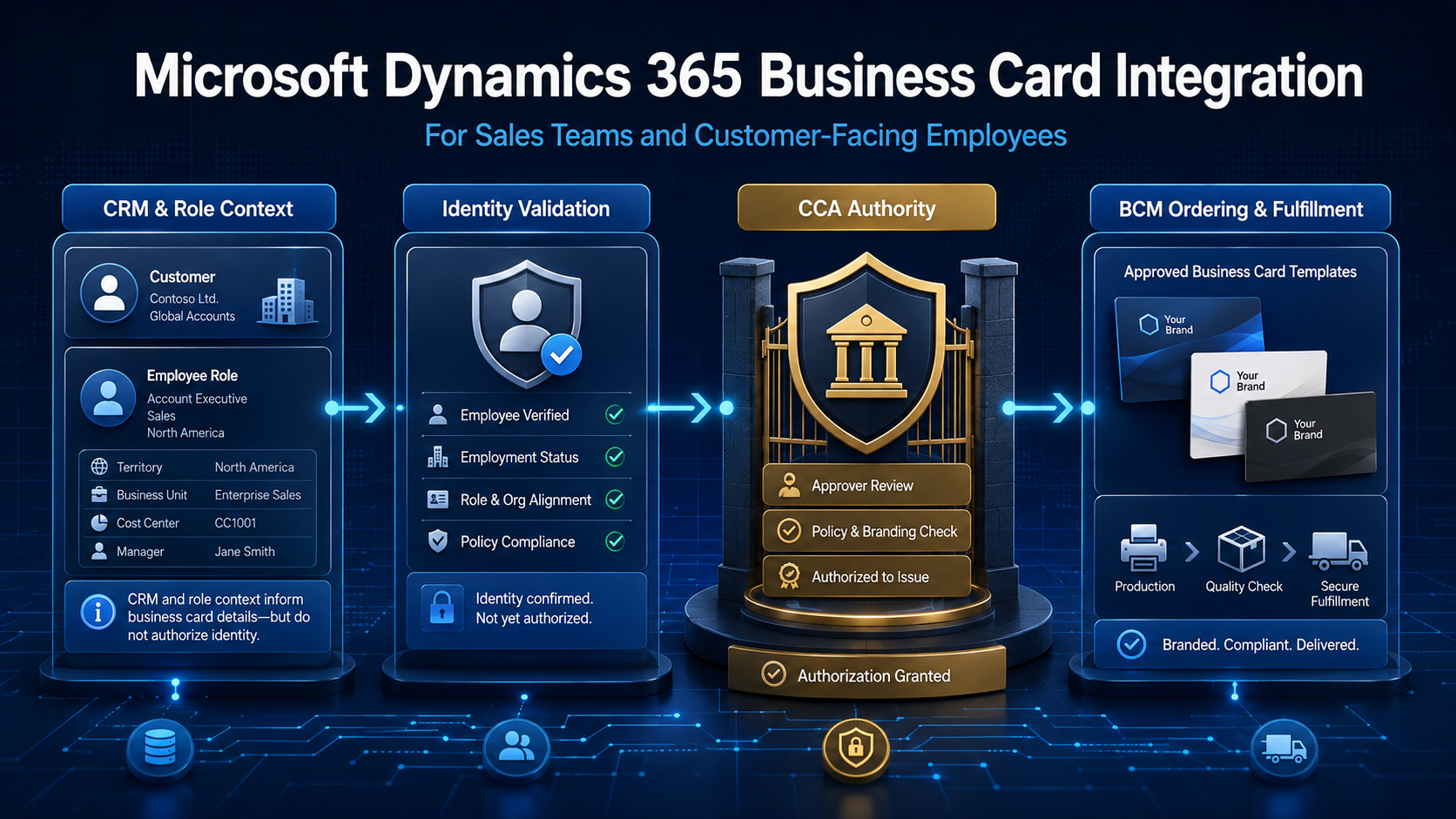
| EXECUTIVE PERSPECTIVE: A Microsoft Dynamics 365 business card integration can connect sales operations with governed business card ordering for customer-facing employees. CRM context can improve routing and reduce re-entry, but it should not become the sole authority for printed identity. Dynamics 365 contributes approved business context; CCA governs authority and exceptions; BCM executes the controlled transaction. |
CRM Connectivity Should Improve Execution Without Redefining Identity Authority
Microsoft Dynamics 365 can hold valuable context about customer-facing teams: organizational units, territories, markets, business lines, accounts, activities, and operational roles. Connecting selected context to business card ordering can reduce duplicate entry, route requests more accurately, and help sales operations support employees whose external presentation must match the customers and entities they represent.
The integration boundary matters. A CRM user record or sales role does not automatically authorize a printed title, public phone number, legal-entity line, brand, language, quantity, or production release. CRM data is designed primarily to support customer relationships and commercial activity. Public employee identity remains a governed enterprise asset shaped by HR, brand, legal, procurement, regional, and business policy.
Business Card Manager (BCM) manages the controlled request, business card approval workflows, template, order, supplier, and fulfillment process. Color Card Administrator (CCA), where deployed as the enterprise authority layer, can evaluate source precedence, eligibility, customer-facing presentation, delegated authority, effective dates, and exceptions before releasing an approved identity specification to BCM.
Why Microsoft Dynamics 365 Is a High-Value BCM Integration
Microsoft Dynamics 365 is the fourth priority in the approved BCM integration roadmap because customer-facing employees often work across territories, brands, legal entities, markets, and specialist roles. The integration opportunity is to connect relevant commercial context to the correct BCM account, template family, approval path, quantity policy, cost allocation, and fulfillment destination without allowing CRM convenience to override identity governance.
- Reduce repeated entry of approved organizational, market, territory, or business-unit context.
- Route customer-facing employees to the correct account, template family, approver, and supplier path.
- Support sales operations with controlled request-on-behalf workflows for distributed teams.
- Distinguish internal CRM roles from approved customer-facing titles and representations.
- Apply material-change rules when territories, business lines, brands, or responsibilities change.
- Link request, approval, order, fulfillment, cost, and exception evidence for operational reporting.
Dynamics 365 should remain authoritative only for the CRM facts it legitimately owns. Employee status may come from HR; authentication and account state may come from the identity platform; approved public titles may be governed separately; legal and brand lines may be policy-controlled; and BCM remains responsible for controlled ordering and fulfillment.
What a Governed Dynamics 365-to-BCM Workflow Looks Like
A strong integration uses minimum necessary CRM context as one input to a governed identity decision. Exact Microsoft Dynamics 365 applications, Dataverse tables, APIs, events, fields, mappings, security roles, environments, and timing should be confirmed for the organization’s architecture, data model, CCA policies, and BCM configuration.
- Correlate the employee. Use an approved stable identifier to associate the requester with the correct employee and Dynamics 365 context; avoid relying on names alone.
- Retrieve approved CRM context. Use only the organizational, market, territory, team, or operational role data required for the declared ordering purpose.
- Resolve identity authority. CCA or configured policy determines which source owns each printed field, who is eligible, and whether CRM context may influence routing or presentation.
- Validate and approve. BCM validates required fields, applies account and template controls, routes material changes or exceptions, and captures the approved request version.
- Order and fulfill. BCM applies quantity and reorder rules, routes the order to the appropriate supplier, and returns production, shipment, and fulfillment status.
- Preserve linked evidence. Authorized teams can connect CRM context, policy decisions, approvals, orders, costs, fulfillment, and exceptions for review and reporting.
The CRM and Identity Decisions That Matter
Integration quality depends on defining what CRM context is allowed to influence before it reaches an order. Enterprise teams should separate employee identity, commercial context, public presentation, approval authority, and production release.
| Decision area | Enterprise question | Governed response |
|---|---|---|
| Correlation | Which CRM user matches which employee? | Use stable identifiers, environment boundaries, and owned duplicate handling. |
| Eligibility | May this employee request or receive a card? | Apply worker, role, location, legal-entity, brand, and population rules. |
| CRM context | Which commercial facts may influence the workflow? | Whitelist required fields and constrain their use to defined routing or policy purposes. |
| Field authority | Which source owns each printed value? | Apply approved precedence, transformations, effective dates, and exception handling. |
| Release | What must be approved before production? | Freeze the approved identity version and apply template, quantity, supplier, and release controls. |
A CRM Role Is Not Automatically an Approved Public Title
Dynamics 365 roles, teams, territories, and record ownership structures exist to support application security and commercial execution. Their labels may be technical, temporary, internally abbreviated, or shaped by the CRM design. They should not be copied automatically into externally presented identity.
A governed model distinguishes the employee’s operational CRM responsibilities from the title, entity, brand, address, phone, language, and credentials approved for public use. Where the CRM contains a customer-facing designation, policy should still define its authority, applicable population, effective date, permitted transformation, and exception owner.
Customer and Account Data Should Stay Outside the Card Workflow
The integration should be purpose-limited. Business card ordering rarely requires customer names, opportunity values, sales notes, contact records, or account histories. Pulling broad CRM datasets into an identity workflow creates unnecessary privacy, security, retention, and operational risk without improving the printed asset.
Field-level governance should identify the minimum Dynamics 365 context required, its owner, permitted use, retention rule, transformation, and failure behavior. In many cases, organizational or routing identifiers are enough. Data minimization keeps the boundary understandable and makes access reviews, monitoring, and incident response easier.
Territory, Brand, and Role Changes Need Materiality Rules
Sales assignments change frequently, but not every CRM update should trigger a new card. A record-owner change may affect workflow administration only. A territory change may require a different contact line or language. A new business unit may alter the legal entity, brand, template, approver, supplier, or cost center. The integration should classify changes according to their effect on public identity and operational execution.
Material changes should initiate review or a replacement request; non-public changes can update routing or reporting without creating physical demand. Effective dates, open-order operational reconciliation, duplicate prevention, and cancellation handling are essential when roles change after approval but before production or delivery.
Operational Benefits Across Sales Operations, Marketing, HR, and Procurement
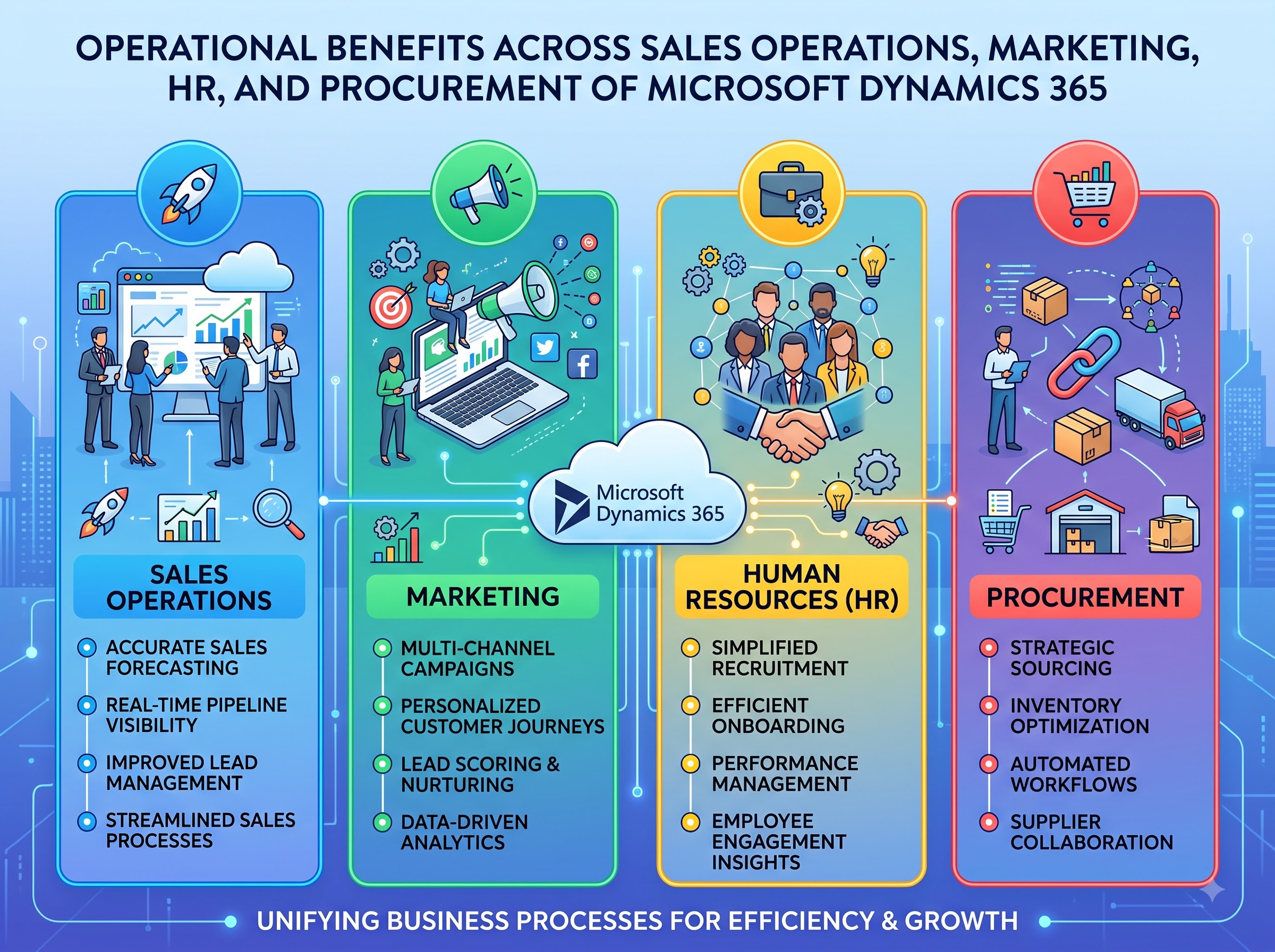
For sales operations, the integration can reduce administrative friction for distributed teams, route requests according to approved business context, support controlled requests on behalf of employees, and improve visibility into pending approvals and fulfillment. It can also help coordinate large onboarding, territory, or campaign-driven requirements without turning CRM administrators into print coordinators.
For marketing and brand teams, locked templates and field authority prevent customer-facing speed from becoming uncontrolled identity. HR and business administrators, source separation protects workforce facts while allowing approved commercial context to influence the workflow. IT and security, minimum-scope access, environment controls, service identities, and monitoring create a governable interface.
For enterprise procurement and finance, linked account, location, quantity, supplier, cost, reorder, and fulfillment evidence improves spend visibility and exception review. For audit and risk teams, the combined record explains which context was used, which policy applied, who approved the identity, and what BCM ultimately produced.
Controls That Should Remain Inside CCA and BCM
CRM connectivity should strengthen—not bypass—the controls that protect enterprise identity, brand, spend, privacy, and fulfillment. The operating model should retain controls such as:
- CCA eligibility, source-authority, public-presentation, delegated-scope, effective-date, and exception decisions;
- BCM role-based access to accounts, templates, locations, and ordering actions;
- required-field validation, permitted-value controls, minimum-necessary CRM access, and material-change reapproval;
- locked templates and approved regional, language, brand, or legal-entity variations;
- quantity limits, reorder rules, duplicate checks, cancellation handling, and supplier routing;
- linked CRM context, policy, request, approval, order, fulfillment, and audit evidence.
This separation keeps responsibilities clear. Dynamics 365 contributes approved commercial context; authoritative employee and policy sources determine the identity facts; CCA governs business identity authority; BCM converts the approved specification into a controlled order and returns execution evidence.
Implementation Priorities for Enterprise Teams
Begin with one Dynamics 365 environment, one controlled customer-facing population, and a narrow use case such as routing approved employee requests by business unit or market. Document correlation identifiers, authoritative sources, eligible populations, permitted CRM fields, public-presentation rules, delegated actions, template families, approvers, suppliers, privacy constraints, and failure ownership before expanding automation.
Technical design should use least-privilege Dataverse or API access, approved service identities, protected credentials, verified tenant and environment boundaries, data-loss-prevention controls where applicable, data minimization, logging, monitoring, retry controls, idempotency, correlation identifiers, retention rules, and owned failure queues. Avoid depending on display names or email addresses when a stable identifier is available.
Testing must cover duplicate users, missing correlations, multiple environments, stale roles, territory changes, business-unit transfers, inactive workers, missing fields, unauthorized columns, CRM outages, expired credentials, throttling, retries, duplicate or out-of-order events, post-approval changes, supplier failures, and termination while an order is open. Useful measures include correction rate, approval cycle time, exception volume, duplicate orders, avoidable reprints, cancellation success, cost attribution, and fulfillment visibility.
From CRM Context to Governed Customer-Facing Identity Execution
Microsoft Dynamics 365 can give BCM-connected enterprises useful commercial context for customer-facing employees, distributed sales teams, and complex operating structures. CCA turns approved context and authoritative identity facts into governed eligibility, presentation, access, and exception decisions. BCM converts the approved outcome into ordering and fulfillment.
The strategic advantage is not CRM-triggered printing. It is context-aware execution: minimum necessary data, stable correlation, clear field authority, controlled public presentation, appropriate approval, selective reissue, visible fulfillment, and evidence the organization can review. That is how a Microsoft Dynamics 365 business card integration becomes enterprise infrastructure rather than another data sync.
| Connect CRM Context to a Governed Business Card Workflow: Explore how Business Card Manager can support controlled customer-facing employee requests, approvals, templates, ordering, fulfillment, and reporting. Request a BCM demonstration and Microsoft Dynamics 365 integration-fit discussion at https://www.businesscardmanager.com/. |