

Business Card Ordering After Employee Role Changes
Evaluate BCM API workflows against manual change requests when employees are promoted or transferred. Compare materiality rules, approved identity, effective dates, existing orders, and operational support.
Business Card Ordering After Employee Role Changes | BCM API vs Manual Requests, Policy & Approvals.
Not every employee role change needs a new business card, yet unclear rules lead to confusion and unnecessary orders. This video shows how to check whether a name, title, or contact details changed, set policies for immediate or routine replacements, and compare the Business Card Manager (BCM) API with manual requests. Learn to separate workforce changes from printed identity and match approvals to ordering needs.
BCM (Business Card Manager) is the enterprise business card ordering management system and contracted business card vendor that converts approved specifications into orders. Business card ordering after employee role changes requires a decision about what should happen to the employee’s cards, pending requests, approvals, and delivery arrangements. A promotion or transfer can create a legitimate need for new cards, but a changed HR record alone should not authorize a purchase.
For enterprise buyers, the practical choice is whether a scoped BCM API workflow can make those decisions more consistent than manual change requests. The strongest design evaluates the change, establishes the identity approved for publication, and authorizes the relevant order. It also accounts for existing transactions so that a corrected title does not silently alter artwork already approved for production.
This article explains how to compare the two approaches using promotions, internal transfers, temporary assignments, and corrected workforce records. The proposed controls are buying and implementation requirements. Available BCM operations, customer application access, and production intervention options must be confirmed for the actual deployment.
Start by Deciding Whether the Change Affects the Card
A role change can affect several parts of the ordering process without changing the printed card. A new manager may change the approval route. A different cost center may change allocation. A territory assignment may establish a new business need while leaving the public title unchanged. Ordering a replacement for every such update creates avoidable work and can leave employees with multiple versions of cards that say the same thing.
Define materiality field by field. Ask whether the approved name, public title, company identity, office address, contact details, brand, language, or template needs to change. Then establish whether policy requires a replacement immediately, at the next normal reorder, or only after an employee confirms an operational need. The decision should be explainable to an administrator without requiring that person to infer policy from a job code.
BCM’s published HCM and CRM integration model distinguishes workforce lifecycle signals from authorization to print. It also describes assessing whether a change affects printed identity or only workflow context. Use that distinction to frame the buying discussion: the integration should help evaluate a role change, rather than turn every update into an order.
Explore the BCM HCM and CRM integration model
Compare the Full Change Process
Manual change requests can work when employees report changes promptly, administrators have a reliable review routine, and the volume is manageable. An employee or coordinator submits the new information, an authorized person checks it, and the ordering team determines what to do. The operating cost includes identifying missing information, resolving conflicting values, and checking whether another request already covers the change.
A scoped API workflow can bring an approved source change into the process earlier and reduce repeated entry. It also introduces mapping, monitoring, and recovery responsibilities. Compare the work required to reach the same authorized outcome, including exceptions and unavailable information. A demonstration that merely populates a title field leaves the most consequential decisions untested.
| Buying criterion | Scoped BCM API workflow | Manual change requests |
|---|---|---|
| Change assessment | Apply agreed materiality rules | Administrator reviews reported change |
| Public identity | Use approved field authority | Verify values with the responsible owner |
| Effective dates | Evaluate current and future changes | Check dates before requesting cards |
| Existing orders | Correlate change with related activity | Review pending requests before purchase |
| After approval | Demonstrate version revalidation | Return material changes for review |
| Operating effort | Include monitoring and recovery | Include discovery, entry and follow-up |
Use the same employee scenarios for both options. A routine promotion is useful, but a future transfer, a withdrawn assignment, and an update received after production release reveal more about the operating model. Require the operator to explain which card version is authorized and which transaction should proceed.
Separate Workforce Facts from Public Identity
An internal position name may be meaningful in HR while being unsuitable for an external business card. A job family, grade, reporting assignment, or sales role can inform eligibility without belonging on the card. The source of a fact and permission to publish it are separate questions.
Establish who owns each printed value. HCM may supply workforce facts. CRM may contribute limited customer-facing context. Where Color Card Administrator is deployed, CCA governs the approved public identity and related exceptions; BCM executes the authorized business card order. The enterprise should identify the actual authority for each field rather than treating the most recently updated application as the winner.
For example, a promotion may change an internal position to a longer title while the approved external title remains unchanged. A manual process should refer that question to the identity owner. An integrated process should apply the agreed mapping or create an owned exception. Neither process should invent a shortened public title merely because the full text does not fit the existing template.
Review BCM business card ordering governance
Evaluate the Effective Date and the Date Cards Are Needed
A future role can be approved weeks before it begins. Cards may need to arrive before a customer event, yet the employee may not be allowed to use the new identity until the effective date. Capture those dates separately. A requested delivery date should not silently change the date on which the title becomes valid.
Ask the enterprise policy owner whether advance ordering is permitted and what approval is required. The workflow may allow preparation, proof review, or an authorized purchase before the role begins. Another population may need to wait for confirmation. The design should record the applicable rule and preserve a route for changes to the underlying assignment.
Test a promotion approved for next month that is subsequently postponed. The operator should be able to identify the affected request and determine the available action. Do not assume BCM can automatically pause, cancel, or recover an order at every stage. Confirm intervention options, cutoffs, and commercial consequences with the contracted service team.
Check Pending Requests Before Starting Another Order
An employee may already have an ordinary reorder, an event request, or an assistant-submitted request in progress. A role change can make one of those requests unsuitable while another remains legitimate. Matching by employee name alone cannot establish whether a new event represents the same ordering need.
Retain the stable employee reference, purpose, source change reference, and related request or order references needed to investigate the case. Determine whether the change should update a draft, reopen a decision, replace a proposed purchase, or create a separate authorized order. A separate event may be valid when the employee needs cards for two approved roles; the workflow should support the distinction through policy and evidence.
For the manual alternative, require the administrator to check existing activity before purchasing. For the API alternative, demonstrate how the application recognizes a previously handled change and how an operator resolves uncertain matches. Do not accept a promise of duplicate prevention without a clear explanation of what counts as the same transaction.
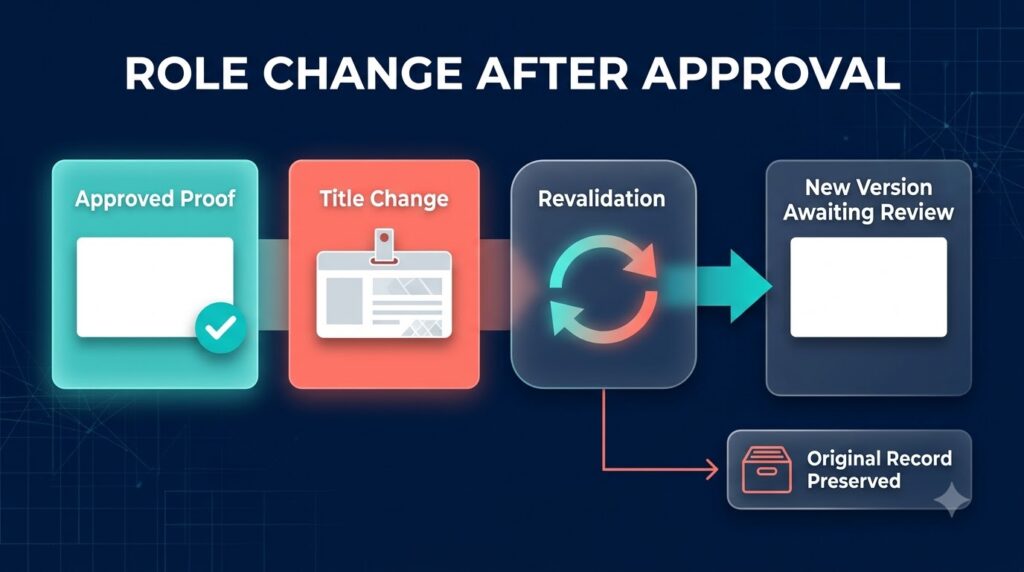
Revalidate a Material Change After Approval
Approval applies to a particular decision and specification. If a title or entity changes after proof approval, the earlier decision may no longer cover the new card. The workflow should determine which approvals need to be repeated and make the current authorized version visible to the person releasing the order.
BCM’s implementation guidance calls for revalidation when material data or template content changes after approval. Translate that principle into an acceptance case. Approve a proof, introduce a relevant role change, and observe what the proposed design does. The operator should be able to show which version is awaiting review and which version, if any, remains authorized for execution.
An update to current employee data should not rewrite the historical record of an earlier purchase. Preserve enough information to establish what was approved and produced. If a later order uses the new title, link it to the relevant change and authorization rather than making the original order appear to have contained the corrected information all along.
Read the enterprise BCM implementation guide
Treat Production Changes as an Operational Decision
Once an order has entered production, changing the employee profile may have no effect on that physical transaction. A service inquiry is needed to establish whether intervention is still possible. Communicate the verified position to the employee so that a saved profile update is not mistaken for a corrected shipment.
Assign an owner to assess the available action with BCM. Depending on the actual order and service terms, the outcome may involve proceeding with the original order, requesting an available correction, or authorizing a separate replacement. The integration must not imply that an accepted change request proves cancellation or that a replacement is free.
Include this case in the cost comparison. Manual follow-up can require significant investigation, but an API connection does not remove the physical and commercial limits of production. Evaluate whether the connected process gives the operator the right references, records the decision, and prevents an unresolved service inquiry from disappearing behind a completed technical task.
Handle Repeated Updates and Corrected Assignments
A role change may be published more than once. Different applications may receive corrections at different times. A delayed message can describe a state that has already been superseded. The receiving workflow needs an agreed way to determine whether the information is current enough to influence an open request.
Use a demonstration in which a future promotion is corrected and the earlier message arrives later. The operator should see the current approved position and the reason an older update was not applied. Confirm which identifiers, effective dates, versions, or source checks the proposed implementation can actually use. Avoid relying on arrival time as the sole definition of authority.
A withdrawn assignment also needs an explicit outcome. The workflow should determine which unsubmitted work can be stopped and which accepted orders need investigation. If the submission result is uncertain, reconcile it through supported records or BCM assistance before attempting another purchase. Technical failure and absence of an order are different conditions.
Reassess Delegation and Access After a Transfer
An internal transfer can change who may request, approve, or follow up on cards for the employee. An assistant authorized for the previous team may retain historical involvement while losing permission to place a new order. A new manager may become responsible for future purchasing decisions without having approved the existing transaction.
Specify the access transition as part of the role-change workflow. Define who can see historical records, who receives current exceptions, and who can act on the next request. Population and action scope matter: authority to view an order does not necessarily include permission to change its delivery address or authorize additional quantity.
Manual processes should update coordinator lists and approval instructions. Integrated processes should demonstrate the relevant permissions in the customer application and BCM configuration. A correct employee title does not compensate for a request still routed to someone who no longer has authority to approve it.
Connect the Applications That Contribute to the Decision
Workday, SAP SuccessFactors, Oracle HCM, ADP, UKG, and Dayforce may hold the workforce change. Microsoft Entra ID may contribute approved directory attributes or access context. Dynamics 365 or HubSpot may hold limited commercial assignments. ServiceNow may provide the request and service conversation. Identify the role each application actually plays before defining the connection.
Confirm the customer’s products, entitlements, integration access, and supported BCM operations. The architecture may use scheduled retrieval, middleware, or another agreed connection method. A named platform in an integration proposal does not establish a released native BCM connector, a specific webhook, or automatic production control.
Where Business Ops Center is deployed, its published ServiceNow model describes operational coordination across workforce facts, approved identity, ordering, and exceptions while preserving application responsibilities. Assess that oversight separately from BCM’s execution role. Specify who notices a failed update, who corrects the source, and who confirms that the employee’s ordering need has been resolved.
Explore BOC coordination for ServiceNow business card requests
Run a Pilot Around Actual Role Change Decisions
Select a defined employee population and one source change path. Include a title-only promotion, a manager change with no print impact, a future transfer, a corrected assignment, a duplicate event, and a change after approval. Add an order already in production so that service intervention is assessed alongside routine processing.
Measure active administrator time, missing information, repeated requests, approval rework, and unresolved exceptions. Record the basis for each decision to order or take no purchasing action. Separate time saved in data entry from elapsed production and delivery time; they describe different outcomes.
For the API option, include monitoring, mapping maintenance, and recovery in the operating estimate. For the manual option, include the work required to discover changes that employees did not report. Expand after the team can support the process during absence, outage, and source correction, with evidence that the authorized specification reaches the correct order.
Questions About Business Card Ordering After Role Changes
Should every promotion trigger a business card order?
No. Evaluate whether the promotion changes approved printed identity, whether the employee needs new cards, and when policy permits a purchase. An internal job update may only affect routing or eligibility.
Can BCM integrate with our HCM role change process?
Assess a scoped connection using confirmed customer application access and supported BCM operations. Define the source event, field authority, effective dates, authorization, and recovery process before assuming an end-to-end automated workflow.
What happens when a title changes after proof approval?
Determine whether the change is material and which decisions require revalidation. Preserve the earlier approved version, establish the new authorized specification, and confirm the actual order position before representing the change as complete.
Can an API cancel cards already in production?
Do not assume that capability. Confirm the supported intervention route, order stage, cutoff, and service terms. A cancellation request needs a verified outcome, and a separate purchase requires appropriate authorization.
How should buyers compare integration with manual requests?
Use identical employee scenarios and service expectations. Compare decision accuracy, administrator effort, exception ownership, historical evidence, and ongoing support, including the cases in which no replacement should be ordered.
Request a BCM Employee Role Change Workflow Assessment
Bring examples of a promotion, an internal transfer, and a role change that affected an existing order. Ask BCM to demonstrate the supported workflow from source information through identity review, authorization, and order handling. Establish which tasks can be connected through the API and which require an assigned operational owner. A useful proposal should explain how the employee gets the correct cards without allowing routine data changes to authorize unintended purchases.
Request pricing or schedule a demo with Business Card Manager to review your employee role change integration scope.