

Microsoft Entra ID Business Card Ordering SSO vs BCM API Integration
Separate sign in from employee data and ordering requirements. Evaluate an SSO-focused BCM scope alongside a broader Microsoft Entra ID and BCM API workflow.
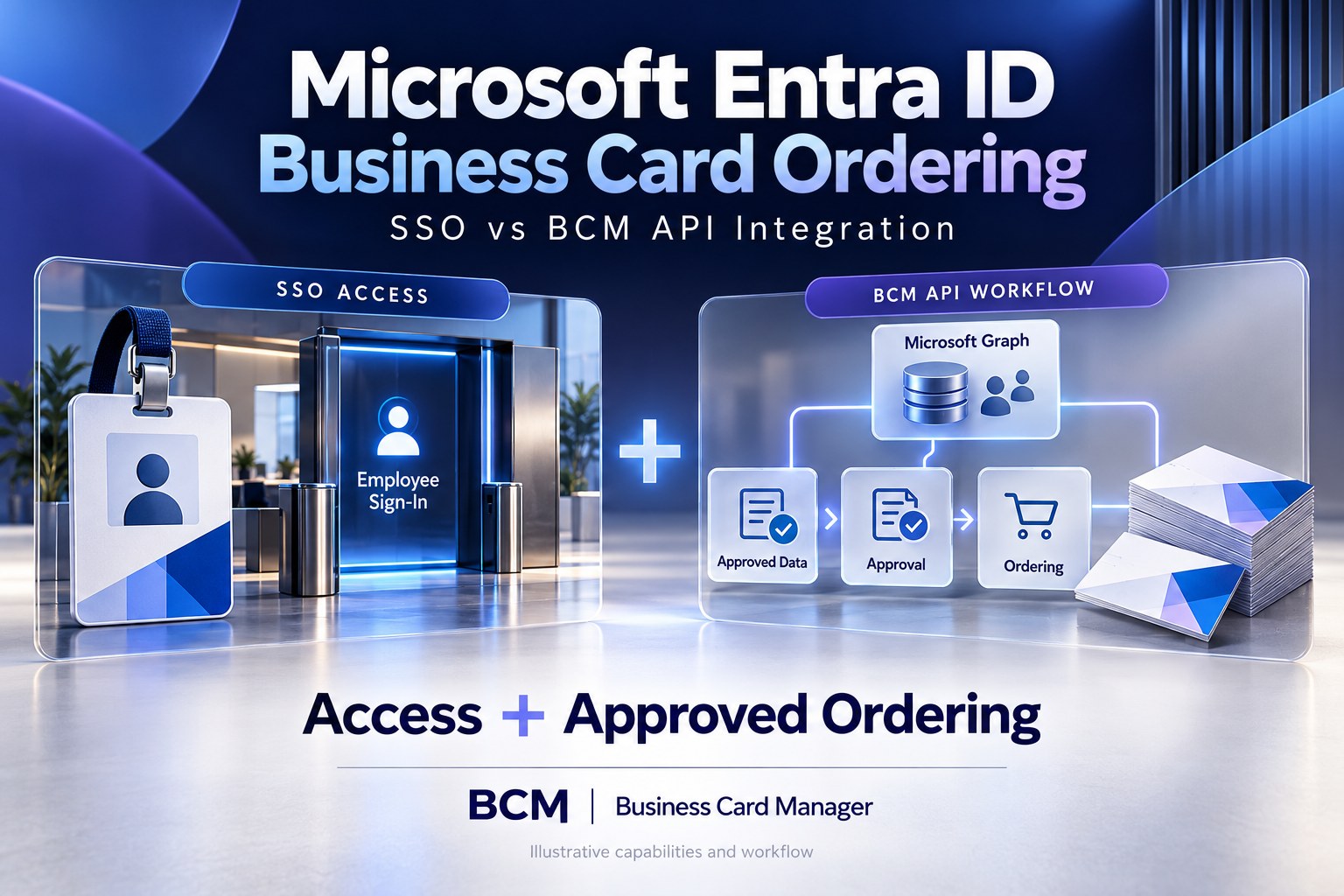
BCM (Business Card Manager) is the enterprise business card ordering management software and contracted vendor enterprises can evaluate when planning Microsoft Entra ID business card ordering and connecting identity signals with controlled card requests. For buyers, single sign-on and API integration address different parts of that connection. SSO supports employee access. A scoped BCM API integration can carry approved information and authorized ordering actions into the business card process. The two can work together.
For Microsoft Entra ID business card ordering, choose the integration scope according to the work the enterprise needs to remove. If the immediate problem is another employee login, assess supported SSO. If administrators repeatedly copy employee details, resolve title changes, or coordinate approved requests across systems, evaluate a directory and ordering connection as well. Do not purchase a sign-in capability expecting it to deliver a complete employee lifecycle workflow.
This comparison gives HR, IT, Brand, and Procurement a common buying framework. It distinguishes authentication, account provisioning, employee information, and purchasing authority, then explains what to ask BCM to demonstrate. Proposed workflows must be matched to current BCM interfaces, customer permissions, and the agreed service scope.
Separate Four Decisions Before Requesting a Quote
Authentication establishes who is signing in. Microsoft describes Entra SSO as enabling users to sign in with their work credentials and access assigned applications through an identity provider. That is the access function to evaluate in the proposed BCM deployment. Confirm the supported method and configuration rather than assuming every application uses the same sign-in arrangement.
Provisioning concerns application user and group records. Microsoft documents SCIM as a standardized mechanism for provisioning users and groups into compatible applications. Provisioning can complement federated sign-in, but the receiving application must support the required interface. Microsoft Entra support for SCIM does not establish that BCM provides a SCIM endpoint.
Employee information is a separate data requirement. Microsoft Graph exposes an Entra user resource and supports selected property retrieval, delta queries, and change notifications. These provide potential building blocks for a permitted directory connection. They do not automatically determine which employee information is approved for a printed card.
Purchasing authority is the final decision. Being able to sign in, having an application account, and possessing a job title do not by themselves authorize a quantity of cards or a production release. The enterprise should specify eligibility, printable identity, template access, approval, and spending rules in the BCM workflow it is buying.
What a BCM API Integration Adds to the Discussion
BCM’s existing Microsoft Entra ID API integration article describes a model using Microsoft Graph and a governed integration layer to connect directory context with approved ordering. It positions BCM as the ordering system and contracted vendor, with CCA governing authorized public identity where deployed. Use that architecture as a starting point for a customer-specific demonstration.
The buying question is which supported BCM operations will remove repeated work in your environment. An implementation may need to prepare a request, transfer approved identity information, submit an authorized transaction, obtain an order reference, or retrieve available progress information. Establish exactly which actions the current interface supports and which require configuration, development, or an administrator.
A useful connection preserves the business decision behind the transaction. For example, a permitted employee request could combine directory context with an approved public title and selected card template before reaching BCM. The integration should retain the approved specification and the evidence that it was authorized. Copying directory fields into a form is only one part of that process.
Microsoft Entra ID Integration With Business Card Manager API
Compare Access Improvement With Workflow Improvement
The matrix below compares two proposed scopes. The SSO-focused scope assumes employee data administration and ordering coordination remain outside the sign-in integration. The broader scope adds a confirmed directory and BCM API workflow. Neither column guarantees a packaged connector or a particular protocol.
| Buyer requirement | SSO focused scope | SSO plus scoped BCM API workflow |
|---|---|---|
| Employee access | Verify supported federated sign in | Verify the same access requirements |
| Employee details | Existing administration remains outside SSO scope | Define permitted retrieval and field mapping |
| Account lifecycle | Confirm separate account management duties | Confirm any provisioning and data duties separately |
| Printable identity | Existing review and ordering process | Preserve approved values in the handoff |
| Authorized order | Existing submission process remains | Demonstrate the required BCM operation |
| Open requests | Existing administrative reconciliation | Define change assessment and exception ownership |
| Support cost | Include sign in support and remaining administration | Add integration operations and change support |
Require the same eligible populations, card families, approval rules, and service outcome in each estimate. A smaller access project may be the right first release, but its quote should make the remaining administrative work visible.
When an SSO Focused Scope Can Be Sufficient
An access project deserves consideration when employees already use a dependable ordering process and the main difficulty is managing separate credentials. Workforce details may be maintained through an existing approved process, request volumes may be manageable, and administrators may have a clear way to resolve employee changes.
In that case, evaluate the proposed sign-in journey, application assignment, role access, support ownership, and the customer’s identity requirements. Also confirm how users who should no longer order are handled. An SSO rollout should have an explicit operating scope even when it leaves employee data and business card approvals with the existing process.
Record what the first release will and will not solve in the project brief. If employees can sign in more easily but administrators still spend time correcting public titles and office details, those activities remain part of the operating cost. Use that baseline to decide whether a later BCM API connection has a measurable business case.
When Directory Data and Ordering Connectivity Deserve Investment
Evaluate the broader scope when employee changes repeatedly cause re-entry, correction, or approval coordination. A geographically distributed sales organization may need current business contact information while preserving approved regional templates and public-facing titles. A directory connection can contribute selected context; BCM can perform the supported ordering actions after the required decisions are complete.
A representative scenario starts with an eligible employee requesting cards. The configured service identifies the correct directory account, retrieves the permitted information, and resolves the printable specification according to policy. The request follows the agreed authorization route before the relevant BCM transaction proceeds. The operator can then connect the originating request with the resulting BCM reference.
Ask BCM to show the handoffs using your fields and rules. Confirm where each transformation runs, who maintains it, and how missing information becomes visible. An integration that reduces entry effort but creates an unowned exception queue has not yet delivered a maintainable ordering service.
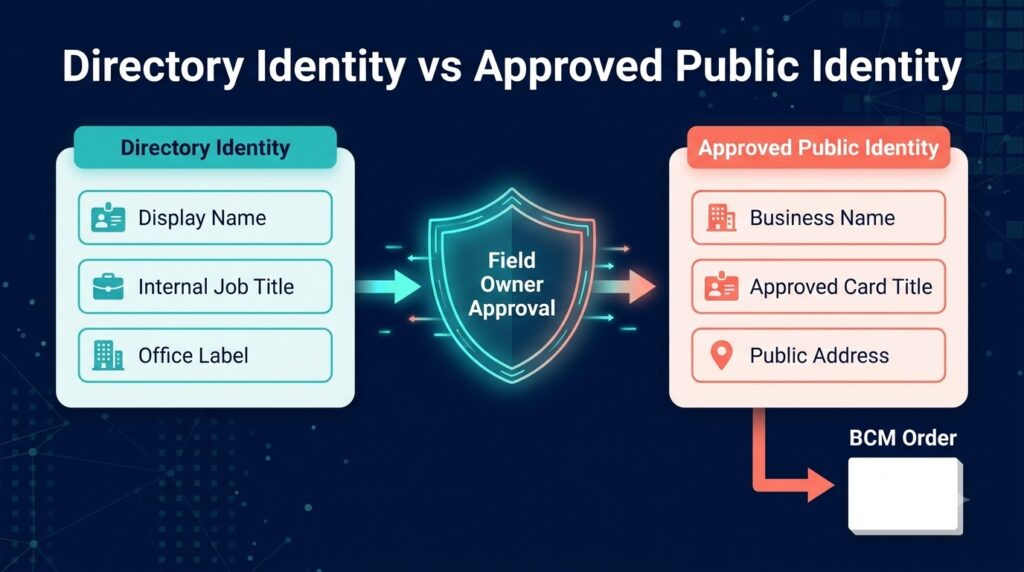
Keep Directory Identity Separate From Public Identity
A directory display name may be appropriate for collaboration tools while the printed card follows a separately approved business name. An internal job title may differ from the title authorized for customer-facing use. A directory office label may need mapping to an approved public address. These are ownership decisions rather than formatting details.
Define the source and approver for each printable field. Specify which values employees may edit, which must remain controlled, and what happens when sources disagree. Where CCA is deployed, align the connection with its business identity governance role. BCM remains the business card ordering management software that receives and executes the authorized specification within the contracted service.
A practical demonstration should include a deliberate mismatch between a directory title and an approved card title. The workflow should preserve the authoritative printable value or route the discrepancy to its owner. Updating every card field whenever a directory value changes can erase a valid business decision.
Resolve Employees, Guests, and Multiple Accounts Deliberately
Define the eligible population before importing directory records. An enterprise may need different rules for employees, external collaborators, shared accounts, or people with more than one account. Do not use the presence of a directory object as the sole reason to create business card demand.
Choose a stable correlation method for the intended identity and retain enough context to distinguish the person, tenant, and relevant business relationship. Email addresses can change and should not be the only matching assumption unless the design explicitly manages that limitation. Ask how the integration handles an account rename, a rehire, or two records that appear to describe the same person.
These scenarios affect the commercial scope. A simple demonstration with one clean account does not establish readiness for a workforce with exceptions. Identify the permitted populations, ambiguous matches, and administrative resolution route before approving production use.
Use HR Systems Without Turning Entra Into the Only Authority
Some organizations maintain employment context in Workday, SAP SuccessFactors, Oracle HCM, ADP, UKG, or Dayforce and publish selected values into their directory. For a proposed BCM workflow, decide whether the directory contains the necessary approved information or whether the process needs a separate authorized workforce source. Confirm each application’s actual access and mapping requirements.
Keep timing visible. A future promotion recorded in HR, a changed directory title, and an approved replacement card request may follow different schedules. The connection should respect when the new public identity becomes valid. Faster data movement is not a reason to release a future title prematurely.
ServiceNow can be evaluated as the request and support channel in a broader design. Microsoft Dynamics or HubSpot may contribute sales context where appropriate. Give each source a defined role so that business context does not silently override approved workforce or printable identity values. Expand the first release only when the additional handoff has a clear purpose.
Test Access Removal and Open Orders Separately
Removing the ability to sign in is different from resolving a card request already in progress. An employee may have an approved request awaiting submission, an accepted order awaiting production, or cards already being produced. The support team needs a defined response for each situation.
Ask the identity team to explain access removal and existing-session handling for the actual application configuration. Ask the ordering team how it identifies affected open work and what intervention remains possible. The BCM service scope should state how cancellation or correction requests are handled and when production limits further changes.
The acceptance test should include an employee who becomes ineligible while a request is open. Verify that the workflow applies the intended rules and gives an operator a trustworthy explanation of the outcome. Avoid assuming that a directory change automatically cancels a physical order or revokes every delegated permission.
Match Permissions to the Connection Being Purchased
An interactive sign-in and a background directory integration can have different access arrangements. Ask the implementation team to document what each component may read or do, who authorizes it, and how its credentials or certificates are maintained. Select permissions appropriate to the confirmed operation rather than requesting broad access for an undefined future use.
Keep data retrieval limited to the ordering purpose. The connection may need a stable identifier, business name, approved title context, office, or business contact details. It should not copy unrelated employee information simply because the source makes it available. Protect diagnostic records as well as the operational payload.
Include a demonstration of an unavailable credential or denied permission. The operator should be able to identify the affected requests, restore the agreed connection through the authorized support route, and reconcile the outcome. The purchase needs an operating process for access failures as well as a successful first exchange.
Compare Cost Using the Work That Remains
Separate the access project from the data and ordering project in the commercial proposal. The former may involve sign-in configuration, application assignment, role mapping, testing, and support. The latter may also require source authorization, field mappings, integration hosting or platform capacity, request orchestration, exception handling, and release testing.
Use the same evaluation period and business population for both scopes. Include BCM implementation and service obligations, relevant Microsoft entitlements, internal administration, and expected change work. Confirm current licensing with the responsible providers; a general product capability does not establish the customer’s entitlement or price.
Measure the work the broader connection is expected to reduce. Useful pilot measures include time spent gathering employee details, requests needing correction, approval delays caused by missing context, and unresolved handoffs. Compare these with the actual cost of maintaining the connection. Do not assign a saving simply because the project contains an API.
Require a Demonstration That Covers the Complete Decision
Use one population, one card family, and a defined request path for the first demonstration. Include a normal request, a directory and printable-title mismatch, an account rename, missing required data, an eligibility change with open work, and an uncertain response after submission. Define the expected business result for each case in advance.
For the uncertain response, ask how the integration determines whether BCM accepted the transaction before another attempt. Confirm the supported correlation, lookup, duplicate-protection, or managed reconciliation process. Automatic retry is insufficient if the team cannot establish whether a repeated submission would create another order.
Record the demonstrated capabilities, dependencies, remaining manual work, and support owners. The resulting proposal should explain the access method, employee data route, supported BCM operations, approval evidence, and ongoing change responsibilities. That is a stronger buying basis than a general statement that the solution supports Microsoft Entra ID.
Frequently Asked Questions
Are SSO and BCM API integration competing options?
They serve different functions and can be combined. SSO addresses the employee sign-in experience. A scoped API workflow can address approved information and ordering actions. Compare the work each proposed scope performs rather than treating them as interchangeable features.
Does Microsoft Entra SCIM support mean BCM supports SCIM?
No. Microsoft describes how compatible applications can participate in provisioning. Confirm whether BCM offers the required provisioning interface and which operations are supported. Do not infer a BCM SCIM endpoint from Entra capabilities.
Can a directory group authorize business card production?
A group may be an input to the configured eligibility or access policy. The enterprise still needs to define template rights, spending authority, printable identity, and approval. Production authorization depends on the agreed BCM workflow and demonstrated controls.
Does the BCM Entra API article establish a ready made certified connector?
It describes an integration architecture using Microsoft Graph and a governed connection. Request current BCM interface documentation and an environment-specific fit discussion. Confirm connector availability and any certification claim directly rather than inferring them from the architecture.
What should a buyer bring to the BCM discussion?
Bring the intended employee populations, tenant context, workforce sources, approved printable fields, card families, approval route, current administrative workload, and desired request experience. These details let the team separate access needs from data and transaction requirements.
Request a Microsoft Entra ID and BCM Integration Discussion
Ask BCM to demonstrate your Microsoft Entra ID business card ordering scenario across employee access, approved identity, request authorization, and the supported ordering action. Compare an SSO-focused release with a broader directory and BCM API connection against the same operating requirements.
Request a scoped proposal that identifies the work each party will perform, the evidence required for acceptance, ongoing support, and the cost of future changes. Choose the connection that resolves the enterprise’s actual coordination problem while retaining clear authority over the cards it orders.
Request pricing or schedule a demo with Business Card Manager to review your Microsoft Entra ID scope.
Discuss Microsoft Entra ID connectivity with Business Card Manager